No Image

USN-4171-6: Apport regression

2020-11-12 KENNETH 0

USN-4171-6: Apport regression USN-4171-1 fixed vulnerabilities in Apport. The update caused a regression when handling configuration files. This update fixes the problem, and also introduces further hardening measures. Original advisory details: Kevin Backhouse discovered Apport would read its user-controlled settings file as the root user. This could be used by a local attacker to possibly crash Apport or have other unspecified consequences. (CVE-2019-11481) Sander Bos discovered a race-condition in Apport during core dump creation. This could be used by a local attacker to generate a crash report for a privileged process that is readable by an unprivileged user. (CVE-2019-11482) Sander Bos discovered Apport mishandled crash dumps originating from containers. This could be used by a local attacker to generate a crash report for a privileged process that is readable by an unprivileged user. (CVE-2019-11483) Sander Bos discovered Apport mishandled lock-file [ more… ]
No Image

USN-4628-2: Intel Microcode regression

2020-11-12 KENNETH 0

USN-4628-2: Intel Microcode regression USN-4628-1 provided updated Intel Processor Microcode. Unfortunately, that update prevented certain processors in the Intel Tiger Lake family from booting successfully. This update reverts the microcode update for the Tiger Lake processor family. Please note that the ‘dis_ucode_ldr’ kernel command line option can be added in the boot menu to disable microcode loading for system recovery. We apologize for the inconvenience. Original advisory details: Moritz Lipp, Michael Schwarz, Andreas Kogler, David Oswald, Catherine Easdon, Claudio Canella, and Daniel Gruss discovered that the Intel Running Average Power Limit (RAPL) feature of some Intel processors allowed a side- channel attack based on power consumption measurements. A local attacker could possibly use this to expose sensitive information. (CVE-2020-8695) Ezra Caltum, Joseph Nuzman, Nir Shildan and Ofir Joseff discovered that some Intel(R) Processors did not properly remove sensitive information before [ more… ]

Amazon DynamoDB 테이블 S3 내보내기 기능 출시 – 코드 없는 데이터 레이크 분석 제공

2020-11-12 KENNETH 0

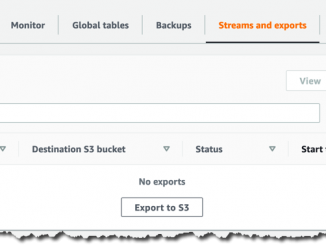
Amazon DynamoDB 테이블 S3 내보내기 기능 출시 – 코드 없는 데이터 레이크 분석 제공 2012년 출시 이래 수십만의 AWS 고객이 미션 크리티컬 워크로드를 지원할 솔루션으로 Amazon DynamoDB를 선택했습니다. DynamoDB는 비관계형 관리형 데이터베이스로, 사실상 무한한 양의 데이터를 저장하며 규모에 관계없이 1밀리초 단위로 데이터를 검색할 수 있습니다. 이 데이터를 최대한 활용하려면 고객은 AWS Data Pipeline, Amazon EMR 또는 DynamoDB 스트림 기반의 기타 솔루션을 사용해야 했습니다. 이러한 솔루션은 일반적으로 읽기 처리량이 높은 맞춤형 애플리케이션을 구축해야 하므로 유지 관리 및 운영 비용이 많이 듭니다. 오늘 AWS는 코드를 작성하지 않고도 DynamoDB 테이블 데이터를 Amazon Simple Storage Service(S3)로 내보낼 수 있는 새로운 기능을 출시합니다. 이 기능은 DynamoDB의 새로운 네이티브 기능이므로 서버 또는 클러스터를 관리할 필요가 없고 규모에 관계없이 작동하며, 여러 AWS 리전 및 계정에 걸쳐 데이터를 초 단위로 지난 35일 동안 원하는 시점으로 내보낼 수 있습니다. 또한 프로덕션 테이블의 읽기 용량이나 가용성에는 영향을 주지 않습니다. DynamoDB [ more… ]

Amazon S3 Intelligent-Tiering, 아카이브 액세스 계층 추가

2020-11-12 KENNETH 0

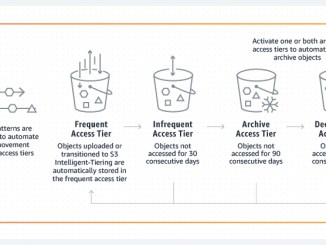
Amazon S3 Intelligent-Tiering, 아카이브 액세스 계층 추가 AWS는 2년 전에 S3 Intelligent-Tiering을 출시하면서 데이터 액세스 패턴을 깊이 이해하지 못해도 S3를 활용할 수 있는 기능을 추가했습니다. 오늘, 거의 액세스하지 않는 객체를 자동으로 아카이브하는 S3 Intelligent-Tiering의 두 가지 새로운 최적화 기능을 출시합니다. 이러한 새로운 최적화 기능을 통해 예측할 수 없는 액세스 패턴이 있고 간혹 몇 달 동안 액세스하지 않는 객체를 아카이브하는 데 필요한 수동 작업의 양을 줄일 수 있습니다. S3 Intelligent-Tiering이란 무엇인가요? S3 Intelligent-Tiering은 성능 저하 또는 운영 오버헤드 없이 가장 경제적인 액세스 계층으로 데이터를 자동으로 이동함으로써 스토리지 비용을 최적화하도록 설계된 스토리지 클래스입니다. Amazon S3에 S3 Intelligent-Tiering을 추가하여 올바른 스토리지 클래스를 사용하는 데 따르는 문제와 액세스 패턴이 불규칙할 때 비용을 최적화하는 데 따르는 문제를 해결했습니다. S3 Intelligent-Tiering은 액세스 패턴이 변경될 때 액세스 계층 간에 세분화된 객체 수준에서 데이터를 이동함으로써 비용을 자동으로 절감합니다. 이는 알 수 없거나 예측할 수 없는 액세스 패턴이 있는 [ more… ]

Announcing Windows 10 Insider Preview Build 20257

2020-11-12 KENNETH 0

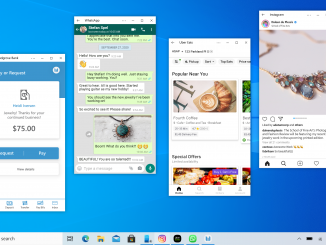
Announcing Windows 10 Insider Preview Build 20257 Hello Windows Insiders, today we’re releasing Windows 10 Insider Preview Build 20257 (FE_RELEASE) to Windows Insiders in the Dev Channel. Other updates for Insiders Announcing Your Phone multi-apps experience – interact with multiple Android mobile apps at the same time on your Windows 10 PC The Your Phone apps experience continues to evolve. We are happy to announce that the multi-apps experience is now ready for you to try. You can experience the power and convenience of running multiple Android mobile apps side by side on your Windows 10 PC on supported Samsung devices. Apps will launch in separate windows enabling you to interact with multiple apps at the same time even if the Your Phone app is not open. Pin your apps to Favorites, Windows 10 taskbar or Start menu for quick [ more… ]