[도서] 인공지능, 보안을 배우다

2019-04-09 KENNETH 0

[도서] 인공지능, 보안을 배우다 분야별 신상품 – 국내도서 – 컴퓨터와 인터넷 [도서]인공지능, 보안을 배우다 서준석 저 | 비제이퍼블릭(BJ퍼블릭) | 2019년 04월 판매가 28,800원 (10%할인) | YES포인트 1,600원(5%지급) 이벤트 : IT모바일 예약판매 이벤트 프로젝트로 익히는 정보 보안과 머신러닝 인공지능 시대의 정보 보안 분야 필독서 바야흐로 ‘인공지능의 시대’가 도래했다. 모든 사람이 인공지능을 이야기하고, 사람들의 일상생활 깊숙한 곳까지 인공지능 기 Source: [도서] 인공지능, 보안을 배우다

No Image

USN-3938-1: systemd vulnerability

2019-04-09 KENNETH 0

USN-3938-1: systemd vulnerability systemd vulnerability A security issue affects these releases of Ubuntu and its derivatives: Ubuntu 18.10 Ubuntu 18.04 LTS Ubuntu 16.04 LTS Ubuntu 14.04 LTS Summary The systemd PAM module could be used to gain additional PolicyKit privileges. Software Description systemd – system and service manager Details Jann Horn discovered that pam_systemd created logind sessions using some parameters from the environment. A local attacker could exploit this in order to spoof the active session and gain additional PolicyKit privileges. Update instructions The problem can be corrected by updating your system to the following package versions: Ubuntu 18.10 libpam-systemd – 239-7ubuntu10.12 Ubuntu 18.04 LTS libpam-systemd – 237-3ubuntu10.19 Ubuntu 16.04 LTS libpam-systemd – 229-4ubuntu21.21 Ubuntu 14.04 LTS libpam-systemd – 204-5ubuntu20.31 To update your system, please follow these instructions: https://wiki.ubuntu.com/Security/Upgrades. In general, a standard system update will make all the necessary [ more… ]

Releasing the May 2019 Update to the Release Preview ring

2019-04-09 KENNETH 0

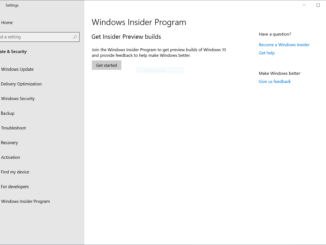
Releasing the May 2019 Update to the Release Preview ring Hello Windows Insiders, Last week, we announced how we are improving the Windows 10 update experience with the Windows 10 May 2019 Update in a blog post from Mike Fortin. As part of that blog post, Mike outlined how we plan to deploy the May 2019 Update to customers. Right now, the May 2019 Update (Build 18362.30) is being rolled out to the Release Preview ring starting with seekers. The May 2019 Update will remain in the Release Preview ring for an increased amount of time in order give us additional time and signals to detect any issues before broader deployment. Check your Windows Insider Program settings With the Windows 10 May 2019 Update being rolled out to the Release Preview ring today, we’re planning to move Windows Insiders in [ more… ]

No Image

USN-3941-1: Lua vulnerability

2019-04-09 KENNETH 0

USN-3941-1: Lua vulnerability lua5.3 vulnerability A security issue affects these releases of Ubuntu and its derivatives: Ubuntu 18.10 Ubuntu 18.04 LTS Ubuntu 16.04 LTS Summary Lua could be made to crash if it received a specially crafted script. Software Description lua5.3 – Simple, extensible, embeddable programming language Details Fady Othman discovered that Lua incorrectly handled certain scripts. An attacker could possibly use this issue to cause a denial of service. Update instructions The problem can be corrected by updating your system to the following package versions: Ubuntu 18.10 lua5.3 – 5.3.3-1ubuntu0.18.10.1 Ubuntu 18.04 LTS lua5.3 – 5.3.3-1ubuntu0.18.04.1 Ubuntu 16.04 LTS lua5.3 – 5.3.1-1ubuntu2.1 To update your system, please follow these instructions: https://wiki.ubuntu.com/Security/Upgrades. In general, a standard system update will make all the necessary changes. References CVE-2019-6706 Source: USN-3941-1: Lua vulnerability

Windows 10 Tip: Snip & Sketch

2019-04-09 KENNETH 0

Windows 10 Tip: Snip & Sketch Did you know easy snipping is just a single step away, thanks to the Windows 10 October 2018 Update?   Since it’s available in the Microsoft Store, Snip & Sketch (originally introduced as part of the Windows Ink Workspace under the name “Screen Sketch”) can update faster and more frequently. It’s already had four app updates with new features since it was introduced in the fall.  Unlike Screen Sketch, the Snip & Sketch app will show up on the taskbar and in the task switcher (Alt+tab), which makes it much easier to multi-task. You can also set the window size, and it even supports multiple windows.  To quickly snip and share a screenshot, press the Windows key + Shift + S to bring up a snipping toolbar – use it to snip a rectangle, something a bit more freeform, or full screen and it will go straight to your clipboard. If that’s all [ more… ]