No Image

September 2018 Security Update Release

2018-09-12 KENNETH 0

September 2018 Security Update Release Today, we released security updates to provide additional protections against malicious attackers. As a best practice, we encourage customers to turn on automatic updates. More information about this month’s security updates can be found in the Security Update Guide. MSRC team Source: September 2018 Security Update Release

No Image

Video: Acrobat soars to another level with digital pen

2018-09-12 KENNETH 0

Video: Acrobat soars to another level with digital pen When she’s not working, Marta Luis Burguete likes to hang out – upside down from the ceiling, as an aerial acrobat. In a new video tutorial, the Microsoft product specialist brings together her passion and her profession to show how to use a digital pen, a Surface Pro and Microsoft Office to edit a flyer, script and stage floor plan for an Aerial Circus School show. Check out the video tutorial below, in which she demonstrates how to use the digital pen to edit these plans and promotions for the show. She uses PowerPoint to edit the flyer with ink to text, ink to shape and ink replay, as well as to create the stage floor plan using the ruler, segment eraser and ink replay. In Word, she uses ink editor [ more… ]

No Image

RHSA-2018:2666-1: Important: chromium-browser security update

2018-09-11 KENNETH 0

RHSA-2018:2666-1: Important: chromium-browser security update Red Hat Enterprise Linux: An update for chromium-browser is now available for Red Hat Enterprise Linux 6 Supplementary. Red Hat Product Security has rated this update as having a security impact of Important. A Common Vulnerability Scoring System (CVSS) base score, which gives a detailed severity rating, is available for each vulnerability from the CVE link(s) in the References section. CVE-2018-16065, CVE-2018-16066, CVE-2018-16067, CVE-2018-16068, CVE-2018-16069, CVE-2018-16070, CVE-2018-16071, CVE-2018-16073, CVE-2018-16074, CVE-2018-16075, CVE-2018-16076, CVE-2018-16077, CVE-2018-16078, CVE-2018-16079, CVE-2018-16080, CVE-2018-16081, CVE-2018-16082, CVE-2018-16083, CVE-2018-16084, CVE-2018-16085, CVE-2018-16086, CVE-2018-16087, CVE-2018-16088 Source: RHSA-2018:2666-1: Important: chromium-browser security update

No Image

RHSA-2018:2664-1: Critical: Red Hat JBoss Enterprise Application Platform 5.2 security update

2018-09-11 KENNETH 0

RHSA-2018:2664-1: Critical: Red Hat JBoss Enterprise Application Platform 5.2 security update Red Hat Enterprise Linux: A security update is now available for Red Hat JBoss Enterprise Application Platform from the Customer Portal. Red Hat Product Security has rated this update as having a security impact of Critical. A Common Vulnerability Scoring System (CVSS) base score, which gives a detailed severity rating, is available for each vulnerability from the CVE link(s) in the References section. CVE-2018-12533 Source: RHSA-2018:2664-1: Critical: Red Hat JBoss Enterprise Application Platform 5.2 security update

Windows 10 Tip: Set up Windows Hello from your lock screen

2018-09-11 KENNETH 0

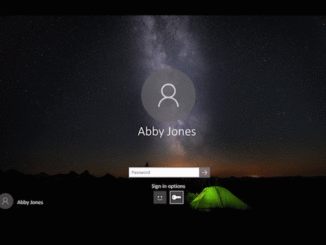
Windows 10 Tip: Set up Windows Hello from your lock screen If you’re interested in setting up Windows Hello to sign in faster and more securely, you can do so, thanks to the Windows 10 April 2018 Update. Previously Microsoft account users had to navigate deep into Settings to find Windows Hello. Now, you can set up Windows Hello Face, Fingerprint or PIN straight from your lock screen by clicking the Windows Hello tile under Sign-in options. Check it out in action: This feature is only available for users who use their Microsoft Account to sign in to Windows. It is not available for work or school accounts, or local accounts.   If you like this, check out more Windows 10 Tips. Source: Windows 10 Tip: Set up Windows Hello from your lock screen