Modernizing the DOM tree in Microsoft Edge

2017-04-20 KENNETH 0

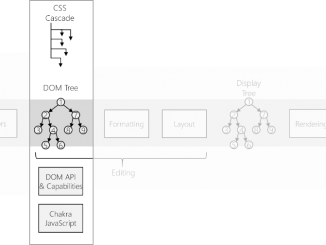
Modernizing the DOM tree in Microsoft Edge The DOM is the foundation of the web platform programming model, and its design and performance impacts the rest of the browser pipeline. However, its history and evolution is far from a simple story. What we think of as “the DOM” is really the cooperation of several subsystems, such as JS binding, events, editing, spellchecking, HTML attributes, CSSOM, text, and others, all working together. Of these subsystems, the DOM “tree” is at the center. A diagram of the web platform pipeline. This post focuses on the DOM tree and cooperating components. Several years ago, we began a long journey to update to a modern DOM “tree” (node connectivity structures). By modernizing the core tree, which we completed in Microsoft Edge 14, we landed a new baseline and the scaffolding to deliver on our [ more… ]

No Image

Announcing Windows 10 Insider Preview Build 16179 for PC + Build 15205 for Mobile

2017-04-20 KENNETH 0

Announcing Windows 10 Insider Preview Build 16179 for PC + Build 15205 for Mobile Hello Windows Insiders! Today we are excited to be releasing Windows 10 Insider Preview Build 16179 for PC to Windows Insiders in the Fast ring. We are also releasing Windows 10 Mobile Insider Preview Build 15204 to Insiders in the Fast ring. What’s New in Build 16179 For PC Revert VM: Continuing our theme of simplifying Hyper-V for developers on Windows 10 (see What’s New), we’re introducing automatic checkpoints so that you’ll always be able to undo a mistake in your virtual machine – you can now always revert to the last time you started a virtual machine. Introducing Power Throttling*: You may remember some of the power experiments we did back in January with Build 15002. Power Throttling was one of those experiments, and showed to have up [ more… ]

No Image

A Week with Microsoft Edge: Personalizing the web

2017-04-20 KENNETH 0

A Week with Microsoft Edge: Personalizing the web Next up in our series, A Week with Microsoft Edge we’re sharing tips for personalizing the web. With so much time spent browsing the web, we all want an experience that feels personal and custom, and with Microsoft Edge it’s easy to do just that. Here are some tips on how to personalize the web in Microsoft Edge. In case you missed our previous blog posts, we kicked off a blog post series, A Week with Microsoft Edge earlier this week all about introducing you to the best of Microsoft Edge. Here are some additional resources for personalizing the web in Microsoft Edge. <!– !function(a,b){"use strict";function c(){if(!e){e=!0;var a,c,d,f,g=-1!==navigator.appVersion.indexOf("MSIE 10"),h=!!navigator.userAgent.match(/Trident.*rv:11./),i=b.querySelectorAll("iframe.wp-embedded-content");for(c=0;c<i.length;c++){if(d=i,!d.getAttribute("data-secret"))f=Math.random().toString(36).substr(2,10),d.src+="#?secret="+f,d.setAttribute("data-secret",f);if(g||h)a=d.cloneNode(!0),a.removeAttribute("security"),d.parentNode.replaceChild(a,d)}}}var d=!1,e=!1;if(b.querySelector)if(a.addEventListener)d=!0;if(a.wp=a.wp||{},!a.wp.receiveEmbedMessage)if(a.wp.receiveEmbedMessage=function(c){var d=c.data;if(d.secret||d.message||d.value)if(!/[^a-zA-Z0-9]/.test(d.secret)){var e,f,g,h,i,j=b.querySelectorAll('iframe[data-secret="'+d.secret+'"]'),k=b.querySelectorAll('blockquote[data-secret="'+d.secret+'"]');for(e=0;e<k.length;e++)k[e].style.display="none";for(e=0;e1e3)g=1e3;else if(~~g<!]]> <!– !function(a,b){"use strict";function c(){if(!e){e=!0;var a,c,d,f,g=-1!==navigator.appVersion.indexOf("MSIE 10"),h=!!navigator.userAgent.match(/Trident.*rv:11./),i=b.querySelectorAll("iframe.wp-embedded-content");for(c=0;c<i.length;c++){if(d=i,!d.getAttribute("data-secret"))f=Math.random().toString(36).substr(2,10),d.src+="#?secret="+f,d.setAttribute("data-secret",f);if(g||h)a=d.cloneNode(!0),a.removeAttribute("security"),d.parentNode.replaceChild(a,d)}}}var d=!1,e=!1;if(b.querySelector)if(a.addEventListener)d=!0;if(a.wp=a.wp||{},!a.wp.receiveEmbedMessage)if(a.wp.receiveEmbedMessage=function(c){var d=c.data;if(d.secret||d.message||d.value)if(!/[^a-zA-Z0-9]/.test(d.secret)){var e,f,g,h,i,j=b.querySelectorAll('iframe[data-secret="'+d.secret+'"]'),k=b.querySelectorAll('blockquote[data-secret="'+d.secret+'"]');for(e=0;e<k.length;e++)k[e].style.display="none";for(e=0;e1e3)g=1e3;else if(~~g<!]]> <!– !function(a,b){"use strict";function c(){if(!e){e=!0;var a,c,d,f,g=-1!==navigator.appVersion.indexOf("MSIE 10"),h=!!navigator.userAgent.match(/Trident.*rv:11./),i=b.querySelectorAll("iframe.wp-embedded-content");for(c=0;c<i.length;c++){if(d=i,!d.getAttribute("data-secret"))f=Math.random().toString(36).substr(2,10),d.src+="#?secret="+f,d.setAttribute("data-secret",f);if(g||h)a=d.cloneNode(!0),a.removeAttribute("security"),d.parentNode.replaceChild(a,d)}}}var d=!1,e=!1;if(b.querySelector)if(a.addEventListener)d=!0;if(a.wp=a.wp||{},!a.wp.receiveEmbedMessage)if(a.wp.receiveEmbedMessage=function(c){var d=c.data;if(d.secret||d.message||d.value)if(!/[^a-zA-Z0-9]/.test(d.secret)){var e,f,g,h,i,j=b.querySelectorAll('iframe[data-secret="'+d.secret+'"]'),k=b.querySelectorAll('blockquote[data-secret="'+d.secret+'"]');for(e=0;e<k.length;e++)k[e].style.display="none";for(e=0;e1e3)g=1e3;else [ more… ]

Building a Telepresence App with HoloLens and Kinect

2017-04-19 KENNETH 0

Building a Telepresence App with HoloLens and Kinect When does the history of mixed reality start? There are lots of suggestions, but 1977 always shows up as a significant year. That’s the year millions of children – many of whom would one day become the captains of Silicon Valley – first experienced something they wouldn’t be able to name for another decade or so. The plea of an intergalactic princess that set off a Star Wars film franchise still going strong today: “Help me Obi-wan Kenobi, you’re my only hope.” It’s a fascinating validation of Marshal McLuhan’s dictum that the medium is the message. While the content of Princess Leia’s message is what we have an emotional attachment to, it is the medium of the holographic projection – today we would call it “augmented reality” or “mixed reality” – that [ more… ]

Introducing Power Throttling

2017-04-19 KENNETH 0

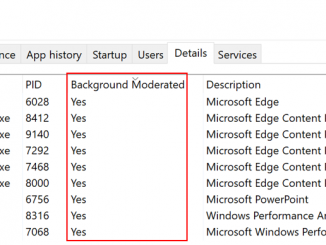
Introducing Power Throttling Most people running Windows like having multiple apps running at the same time – and often, what’s running in the background can drain your battery. In this latest Insider Preview build (Build 16176), we leveraged modern silicon capabilities to run background work in a power-efficient manner, thereby enhancing battery life significantly while still giving users access to powerful multitasking capabilities of Windows. With “Power Throttling”, when background work is running, Windows places the CPU in its most energy efficient operating modes – work gets done, but the minimal possible battery is spent on that work. You may remember some of our January power experiments we mentioned in Build 15002’s release notes. Power Throttling was one of those experiments, and showed up to 11% savings in CPU power consumption for some of the most strenuous use cases. We’ve [ more… ]