Amazon EMR 인스턴스 집합(Instance Fleets) 기능 출시!

2017-03-22 KENNETH 0

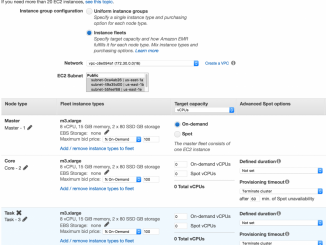
Amazon EMR 인스턴스 집합(Instance Fleets) 기능 출시! 인스턴스 집합(instance fleets) 기능이 Amazon EMR 클러스터에서도 사용할 수 있습니다. 이는 인스턴스 프로비저닝과 관련된 다양한 옵션과 스마트한 기능을 제공합니다. 5개 인스턴트 타입에 대해 가중치 기반 컴퓨팅 용량 및 스팟 인스턴스 가격 입찰을 할 수 있습니다. EMR 클러스터를 만들 때, 이들 인스턴스 유형에 대해 온-디멘드 및 스팟 용량을 자동으로 제공합니다. 이를 통해 클러스터에 원하는 용량을 신속하게 확보 및 유지 관리하는 것이 보다 쉽게 가능해질 뿐 아니라 비용 또한 효율적입니다. 원하는 가용 영역(AZ)를 지정할 수 있으며, EMR은 리전 내 AZ 중 하나에서 클러스터를 실행할 수 있습니다. EMR은 인스턴스 집합에서 사용 가능한 타입으로 인스턴스를 교체하여 스팟 인스턴스가  중단되는 경우 클러스터를 재조정할 수 있습다. 이를 통해 클러스터 내 전체 컴퓨팅 용량을 쉽게 ​​유지할 수 있습니다. 인스턴스 집합은 인스턴스 그룹 대신 사용할 수 있습니다. 그룹과 마찬가지로 클러스터에는 마스터, 코어 및 태스크 집합이 있습니다. AWS 관리 콘솔 업데이트를 살펴보고 [ more… ]


No Image

MySQL InnoDB Cluster – Release Candidate Discussion

2017-03-22 KENNETH 0

MySQL InnoDB Cluster – Release Candidate Discussion You might already have seen the announcement of the MySQL InnoDB Cluster Release Candidate (RC), available for download from our MySQL APT (Ubuntu, Debian) and YUM (Redhat, OEL, Fedora) repositories and from dev.mysql.com. As usual, this releases contains the following three components.… Source: MySQL InnoDB Cluster – Release Candidate Discussion

No Image

Announcing Windows 10 Insider Preview Build 15063 for PC and Mobile

2017-03-21 KENNETH 0

Announcing Windows 10 Insider Preview Build 15063 for PC and Mobile Hello Windows Insiders! Today we are excited to be releasing Windows 10 Insider Preview Build 15063 for PC and Mobile to Windows Insiders in the Fast ring. Other changes, improvements, and fixes for PC We fixed a reliability issue from Build 15061 resulting in Microsoft Edge hanging and becoming completely unresponsive. We fixed an issue for Insiders where the localized files and registry keys associated with any additional language packs on the system would not be installed after enabling .NET Framework 3.5. Other changes, improvements, and fixes for Mobile We fixed the bug causing a number of inbox apps to fail to launch (such as Store) and also preventing any app updates from the Store from working. Thank you all for sending us feedback around this. We fixed the [ more… ]

Ten Windows 10 PCs that unlock Windows Hello

2017-03-21 KENNETH 0

Ten Windows 10 PCs that unlock Windows Hello Windows 10 brings you built-in protection. That means more security features, safer authentication and ongoing updates delivered to you for the supported lifetime of your device, all at no extra cost. One of Windows 10’s built-in security features is Windows Hello, designed to eliminate the use of passwords. Windows Hello is multi-factor authentication that works natively with a PIN, integrated biometric sensor or an accessory. You can simply sign in with a look, touch or your PIN number – in less than two seconds** – and get enterprise-grade security without having to type in a password With this great feature, we thought it would be helpful to round up a list of Windows 10 PCs from our partners that unlock Windows Hello with built-in facial recognition cameras or fingerprint readers. The devices [ more… ]

Windows 10 Tip: Set active hours so your PC won’t restart while you’re working

2017-03-21 KENNETH 0

Windows 10 Tip: Set active hours so your PC won’t restart while you’re working It’s called active hours. Active hours are a time range you can set to let your PC know when you’re usually using your device, so it won’t restart automatically during those times. Here’s how to set up active hours: Select the Start button and select Settings (or use Windows key + I), then “Update & security” and select “Change active hours.” Choose the start time and end time, and then select “Save.” To see all the latest Windows 10 Tips in this series, visit this link. Have a great week! Source: Windows 10 Tip: Set active hours so your PC won’t restart while you’re working