
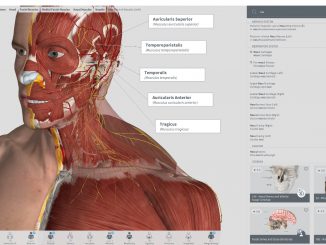
Complete Anatomy: Award-Winning App Comes to Windows Store

2017-03-16 KENNETH 0

Complete Anatomy: Award-Winning App Comes to Windows Store 3D4Medical has just completed the port of its award-winning flagship product Complete Anatomy to Windows Store using the Windows Bridge for iOS. The Windows Bridge is an open-source environment for Objective-C that provides support for third party APIs. The Windows Bridge was a very important component in 3D4Medical’s development team, bringing the high-resolution 3D models and smooth touch interface that its users were already familiar with to the world of Windows PC and Surface users. 3D4Medical created a Universal Windows Platform (UWP) app in response to the huge demand from its core audience of medical students and clinical professionals, many of whom use Windows devices. The app supports multiple Windows form-factors and device configurations. The interface can be manipulated with either a mouse or touch gestures. The experience particularly shines on Surfaces [ more… ]

Announcing Windows 10 Insider Preview Build 15058 for PC

2017-03-15 KENNETH 0

Announcing Windows 10 Insider Preview Build 15058 for PC Hello Windows Insiders! Today we are excited to be releasing Windows 10 Insider Preview Build 15058 for PC to Windows Insiders in the Fast ring. Other changes, improvements, and fixes for PC We fixed the issue causing a number of inbox apps to fail to launch (such as Store) and preventing any app updates from the Store from installing. We fixed another issue causing some UWP apps would unexpectedly appear with their app package name in the title bar as opposed to the app name. We fixed an issue where going to fullscreen or maximizing Microsoft Edge when Microsoft Edge’s window was snapped to a size smaller than half the screen would trigger back navigation. We fixed an issue resulting in the mouse pointer staying visible when watching a video fullscreen [ more… ]

No Image

Windows 10 SDK Preview Build 15052 Released

2017-03-15 KENNETH 0

Windows 10 SDK Preview Build 15052 Released Today, we released a new Windows 10 Creators Update SDK Preview to be used in conjunction with Windows 10 Insider Preview (Build 15052 or greater). The Preview SDK Build 15052 contains bug fixes and under development changes to the API surface area. The Preview SDK can be downloaded from developer section on Windows Insider. For feedback and updates to the known issues, please see the developer forum.  For new feature requests, head over to our Windows Platform UserVoice. What’s New No API changes have occurred since build 15021. Windows SDK setup name change: With this release of the Windows SDK the setup executable name changed.  If you have scripts designed to install the previous SDK, you will need to update the path to use the new name:  WinSDKSetup.exe The Windows SDK will now formally only be supported by [ more… ]

No Image

Recovering from a Failed NGINX Plus Upgrade: ‘module “M” version X instead of Y’

2017-03-14 KENNETH 0

Recovering from a Failed NGINX Plus Upgrade: ‘module “M” version X instead of Y’ If you are using dynamic modules, you might see an error like this during the upgrade to a new NGINX or NGINX Plus release: Setting up nginx-plus (1.11.10-1~xenial) … nginx: [emerg] module “/etc/nginx/modules/ngx_http_geoip_module.so” version 1011005 instead of 1011006 in /etc/nginx/nginx.conf:7 nginx: configuration file /etc/nginx/nginx.conf test failed invoke-rc.d: initscript nginx, action “upgrade” failed. The most likely reason is that you haven’t upgraded the specified dynamic module (.so file): If you are running open source NGINX, dynamic modules must be compiled against the version you are upgrading to. If you are running NGINX Plus, dynamic modules must be compiled against the open source NGINX version that corresponds to the NGINX Plus release you are upgrading to. For the sake of brevity we’ll refer to NGINX Plus only from now on. Don’t Panic! [ more… ]

No Image

Introduction to nginScript

2017-03-14 KENNETH 0

Introduction to nginScript <!– table, th, td { border: 1px solid black; } th { background-color: #d3d3d3; align: left; padding-left: 5px; padding-bottom: 2px; padding-top: 2px; line-height: 120%; } td { padding-left: 5px; padding-bottom: 5px; padding-top: 5px; line-height: 120%; } td.center { text-align: center; padding-bottom: 5px; padding-top: 5px; line-height: 120%; } –> Harnessing the Power and Convenience of JavaScript for Each Request Since nginScript launched in September 2015 it has been remained an experimental module while additional capabilities and core language support were added. With NGINX Plus R12 we are pleased to announce that nginScript is now generally available as a stable module for NGINX and NGINX Plus. nginScript is a unique JavaScript implementation for NGINX and NGINX Plus, designed specifically for server‑side use cases and per‑request processing. It extends NGINX configuration syntax with JavaScript code in order to implement sophisticated configuration solutions. The [ more… ]