This Week on Windows: Cortana, Calendar app, Moana and Planet Earth II

2017-02-24 KENNETH 0

This Week on Windows: Cortana, Calendar app, Moana and Planet Earth II We hope you enjoyed today’s episode of This Week on Windows! Read more about how Cortana can remind you of your commitments, and find out what’s new with your Windows 10 Mail and Calendar apps. Or, head over here for tips on how the Calendar app can help you stay on top of your day. Here’s what’s new in the Windows Store this week: Halo Wars 2 Halo Wars 2 launched worldwide this week on Xbox One and Windows 10 PC through Xbox Play Anywhere! Learn more on Xbox Wire. Gigantic’s Eternal Dawn update is now available Calling all heroes! Gigantic’s Open Beta gets a gigantic update this week with new ways for you to approach the battlefield. The Eternal Dawn update continues to expand and polish the game [ more… ]
Mitigating arbitrary native code execution in Microsoft Edge

2017-02-24 KENNETH 0

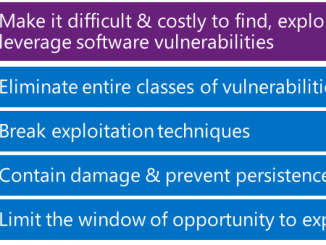
Mitigating arbitrary native code execution in Microsoft Edge Some of the most important security features in modern web browsers are those that you never actually see as you browse the web. These security features work behind the scenes to protect you from browser-based vulnerabilities that could be abused by hackers to compromise your device or personal data. In previous blog posts and presentations, we described some of the recent improvements that have been made to Windows 10 and Microsoft Edge in this space. Today we’re kicking off a two-part blog post that describes our vulnerability mitigation strategy and provides a technical deep-dive into some of the major security improvements that are coming to Microsoft Edge in the Creators Update of Windows 10. Framing our Vulnerability Mitigation Strategy Before we dive in, it may help to start with an overview of [ more… ]

A New Monetization Opportunity: Application Extensions + Microsoft Affiliate Program

2017-02-24 KENNETH 0

A New Monetization Opportunity: Application Extensions + Microsoft Affiliate Program Looking for more ways to monetize your app? App developers can boost their revenue through the Microsoft Affiliate Program. As an affiliate you can earn revenue by promoting content in the Windows Store and Microsoft Store, such as apps, games, music and video. Developers who place links and/or banners on their apps directing users to the Windows Store will receive a commission for each online sale driven by that in-app marketing. You may have participated in other affiliate programs where you get a commission when someone buys something that you link to – the Microsoft Affiliate Program works in much the same way, but is more expansive. A New Opportunity As an app developer, this is a golden opportunity to open a new revenue stream for Universal Windows Apps. Not [ more… ]

Real-Time Communications on the Universal Windows Platform with WebRTC and ORTC

2017-02-23 KENNETH 0

Real-Time Communications on the Universal Windows Platform with WebRTC and ORTC Readers of this blog interested in Real-Time Communications are probably familiar with Google’s WebRTC project. From the WebRTC site: “WebRTC is a free, open project that provides browsers and mobile applications with Real-Time Communications (RTC) capabilities via simple APIs. The WebRTC components have been optimized to best serve this purpose.” At Microsoft, we’ve seen tremendous support grow for WebRTC over the past five years. One of the most pivotal uses of WebRTC is building native video chat apps, which now reach more than one billion users. Google’s native supported platforms for WebRTC include iOS, Android and traditional Win32 desktop apps. On Windows, Microsoft Edge already supports ORTC APIs and now supports WebRTC 1.0 APIs in Insider Preview builds on Desktop devices. For example, if you need to build a WebRTC app in HTML/JS targeted at desktop browsers [ more… ]

Announcing updates to Windows 10 Mail & Calendar apps

2017-02-23 KENNETH 0

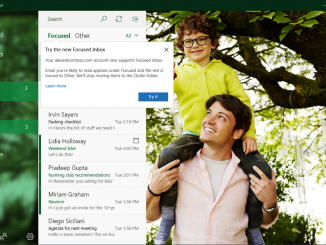
Announcing updates to Windows 10 Mail & Calendar apps We know how important it is you to stay on top of your emails and manage your time well. On the Windows 10 Mail & Calendar team, we’re working hard to come up with new ways to make this possible. Along with architectural improvements that enable enhanced performance and faster innovation, we’re excited to announce several new features today. These new features are beginning to roll out to all Mail & Calendar users over the next few weeks for their Outlook.com and Office 365 accounts. And we’re working hard to bring these to accounts from other providers in the future. Focused Inbox helps you focus on what matters Our inboxes are being inundated with more emails vying for our attention. That’s why we’re giving you a new way to stay focused. [ more… ]