A closer look at the new Lenovo IdeaCentre Y710 Cube and more great Windows 10 PCs

2016-11-09 KENNETH 0

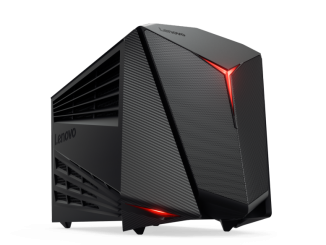
A closer look at the new Lenovo IdeaCentre Y710 Cube and more great Windows 10 PCs There’s a Windows 10 PC built for anything you want to do, whether it’s watching a movie, working in a spreadsheet or playing your favorite games – like Lenovo’s newest gaming PC, the IdeaCentre Y710 Cube, now available at Microsoft Stores and at microsoftstore.com. These devices take advantage of great Windows 10 features, including your digital personal assistant Cortana and compatibility with Xbox Play Anywhere. These devices are redefining the desktop category by taking the desktop from a home appliance – something you keep under your desk – to part of the home décor – something displayed in the living room or on top of the desk to show off. Let’s take a look at some of these desktops: The new Lenovo IdeaCentre Y710 Cube [ more… ]

Citrix ShareFile secured by Windows Hello and Windows Information Protection

2016-11-09 KENNETH 0

Citrix ShareFile secured by Windows Hello and Windows Information Protection Point. Click. Share. More securely. The newest version of ShareFile, the secure file sharing and storage solution used by 99% of the Fortune 500, now integrates two of top security features available in Windows 10 – Windows Hello and Windows Information Protection (WIP).  ShareFile for Windows 10 is optimized for all devices and form factors (AIOs, laptops, 2-in-1, convertibles, tablets and phones) and is available as a free download for Windows 10 customers in the Windows Store today. With the new ShareFile Universal Windows Platform app, customers will be able to sign-in faster, easier and more securely with Windows Hello* using biometric sign-in with a smile or fingerprint or alternatively using ShareFile PIN or Passcode. You can secure your ShareFile account with Windows Hello from “Settings” -> “Passcode settings”. Also, [ more… ]

AWS 주간 소식 모음 – 2016년 11월 8일

2016-11-08 KENNETH 0

AWS 주간 소식 모음 – 2016년 11월 8일 안녕하세요! 여러분~ 매주 화요일 마다 지난 주에 업데이트된 국내 AWS관련 콘텐츠를 정리해 드리는 김지아입니다. AWS 클라우드에 대한 새로운 소식을 확인하시는데 많은 도움 되시길 바랍니다. 혹시 빠지거나 추가할 내용이 있으시면, 저에게 메일 주시면 추가 공유해 드리겠습니다. 오늘의 하이라이트 소식 지난 AWS Enterprise Summit 의 기조 연설 및 세션 발표 동영상을 모두 공개합니다! LG전자와 이랜드의 도입 사례도 함께 보실 수 있습니다. 동영상 페이지를 통해 확인하세요. AWS코리아 블로그 Amazon Linux 콘테이너 이미지 신규 제공 (2016-11-03) Amazon CloudWatch 업데이트– 통계 보유 기간 확대 및 사용자 인터페이스 개선 (2016-11-02) AWS코리아 동영상 AWS Enterprise Summit 2016 | 기조연설 | 김홍재 팀장, LG전자 (2016-11-04) AWS Enterprise Summit 2016 | 기조연설 | Stephen Orban 아마존웹서비스 글로벌 엔터프라이즈 전략 총괄 (2016-11-04) AWS Enterprise Summit 2016 | 환영사 – 염동훈 대표(AWS 코리아) (2016-11-04) AWS Enterprise Summit 2016 | 클라우드 운영 – CCoE, [ more… ]

Trimble brings mixed reality to life for architecture and design

2016-11-08 KENNETH 0

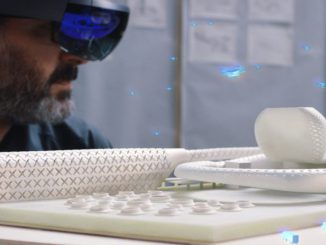
Trimble brings mixed reality to life for architecture and design SketchUp Viewer now available for download in the Windows Store Last month, we showcased our aspiration to empower a new wave of creativity, and our goal to enable that through 3D and mixed reality for everyone. Today, we are thrilled to announce another important milestone in the Microsoft HoloLens and mixed reality journey. This morning at Trimble Dimensions in Las Vegas, alongside Trimble CEO Steve Berglund and prominent architect Greg Lynn, I helped to introduce Trimble’s SketchUp Viewer, which is now available for purchase in the Windows Store. This marks the first extensible commercial HoloLens solution available in the Windows Store that any company in the Architecture, Engineering, Construction and Operations (AECO) industries can buy and use right away. Today, SketchUp is widely used for 3D modeling and design by [ more… ]

Windows 10 Tip: Four ways to customize the Start menu

2016-11-08 KENNETH 0

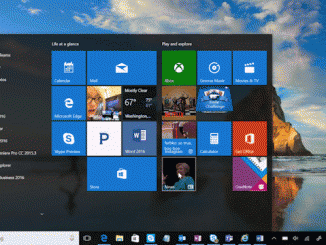
Windows 10 Tip: Four ways to customize the Start menu Today, we’re talking all about getting faster access to your favorite apps with the Start menu! With the Start menu, you can pin your go-to apps and files, get updated info from Live Tiles – like weather and headlines, so you don’t even need to open the app – and more! Here are a few ways you can customize it. Pin your favorite content so it’s always at the ready Easily pin or unpin apps to the Start menu by dragging and dropping an app from list, or by right-clicking and selecting “Pin to Start.” After that, you can click and drag to move apps around or right-click the app to resize. Live Tiles will even surface updates so you can stay up to speed without having to open the app. [ more… ]