New Dell Latitude 7230 Rugged Extreme Tablet aims to help those working in tough environments

2022-10-13 KENNETH 0

New Dell Latitude 7230 Rugged Extreme Tablet aims to help those working in tough environments Not everyone works in an office or at home. If you work in more challenging environments – such as ambulances, fields, factories, deserts and tundras – devices that can withstand harsh conditions and still perform all necessary tasks are a must-have. To fulfill the needs of people who require mobility, ergonomics and durability in a PC, Dell has revealed its new Latitude 7230 Rugged Extreme Tablet. It comes with Windows 11, 12th Gen Intel Core up to i7 processors and integrated Iris Xe graphics. The tablet’s new Wi-Fi 6E* capability and dual broadband support allow faster speeds while energy consumption has gone down. This tablet has many upgrades that enhance its reliability, including increased battery life, with dual hot-swap batteries for continuous operation of the device. [ more… ]
AWS Distribution Seller 파트너사를 위한 AWS GameDay – Cloudy Medium 의 우승 팀을 소개합니다!

2022-10-13 KENNETH 0

AWS Distribution Seller 파트너사를 위한 AWS GameDay – Cloudy Medium 의 우승 팀을 소개합니다! AWS GameDay는 위험 부담이 없는 게임화된 환경에서 실제 문제를 해결하기 위해 Amazon Web Services (AWS) 솔루션을 구현하는 기술을 테스트하는 협업기반 학습 실습입니다. 아키텍트, 개발자, DevOps 엔지니어 등 기술 전문가로 구성된 각 팀 별로 주어진 문제를 해결해 나가면서 AWS 서비스, 아키텍처 패턴, 모범 사례 및 그룹 협력을 살펴볼 수 있는 완전한 실무 기회를 제공합니다. 특히 AWS GameDay의 접근 방식은 기존의 워크샵에 비해 틀에 얽매이지 않습니다. 참가자는 모호성과 비규범적 지침을 기반으로 한 시나리오에서 정해진 정답이 아닌, 개방성이 있는 솔루션을 탐색하게 됩니다. 이를 통해 높은 몰입 경험을 제공하고, 창의적으로 사고할 수 있고, 재미를 느낄 수 있습니다! 2022년 10월 6일, AWS 파트너팀은 에티버스 및 Distribution Seller 파트너사들과 함께 AWS GameDay – Cloudy Medium GameDay를 개최하였습니다. 이번 행사는 AWS와 에티버스(구.영우디지탈)의 AWS Distribution 프로그램 런칭 1주년을 기념해 AWS 경험과 실력을 갖춘 총 [ more… ]

No Image

Inspired by challenges in your workday: latest innovations and updates from Microsoft Edge

2022-10-13 KENNETH 0

Inspired by challenges in your workday: latest innovations and updates from Microsoft Edge What would it feel like to get a boost in half of your workday? If you are an information worker, today you spend over 50% of your computing time in the browser. A browser isn’t just a browser anymore. It’s your center for digital work. Yet it typically looks and acts like the browser of yesterday. Removing daily friction from 50% of your workday matters to us at Microsoft Edge. Not just because we are the browser for business, but more importantly, we see you in your workday, in your pursuit of serving customers, helping teammates, and making a difference. So building a browser that is attuned to your work context is our mission. This Ignite we aim to bring you innovations that will make the familiar [ more… ]

Updated Photos app for Windows 11 with iCloud Photos now rolling out to Windows Insiders

2022-10-12 KENNETH 0

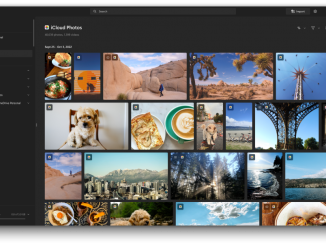
Updated Photos app for Windows 11 with iCloud Photos now rolling out to Windows Insiders Hello Windows Insiders, During today’s event showcasing what’s next for Microsoft Surface, we showed that we’re bringing iCloud Photos integration directly to the updated Photos app which began rolling out to Windows Insiders a few weeks ago. We are beginning to roll out an update to the Photos app today (version 2022.31100.9001.0) to Windows Insiders in the Dev Channel with this new integration. The Microsoft Photos app allows you to view, organize, and share photos from your PC and OneDrive, and with this update, you’ll now be able to add and access your iCloud Photos directly from within the app as well. Your iCloud Photos will appear alongside photos from other sources in the beautifully redesigned “All Photos” gallery view, as well as on a [ more… ]

No Image

11 tips to get the most out of Windows 11

2022-10-12 KENNETH 0

11 tips to get the most out of Windows 11 On Sept. 20, the Windows 11 2022 Update rolled out in more than 190 countries. This first major update to Windows 11, which launched in 2021, shows how Windows keeps evolving and adapting. The newest steps on that journey focus on making the PC easier and safer to use for everyone; empowering people to be more productive; making Windows the best place to connect, create and play; and delivering added security, management and flexibility to the workplace. The 11 features below highlight those key areas: System-wide live captions*: Now the live captions are displayed at the top of the screen, right under the camera on most systems, which makes it easier to follow the captions while continuing to appear engaged in online meetings. But you can also move live captions [ more… ]