
No Image

WP Briefing: Episode 13: Cherishing WordPress Diversity

2021-07-19 KENNETH 0

WP Briefing: Episode 13: Cherishing WordPress Diversity In this episode, Josepha Haden Chomphosy discusses the importance of Diversity, Equity, and Inclusion to the fabric of the WordPress project and how we can move from a place of welcoming it to cherishing it. Have a question you’d like answered? You can submit them to [email protected], either written or as a voice recording. Credits Editor: Dustin Hartzler Logo: Beatriz Fialho Production: Chloé Bringmann Song: Fearless First by Kevin MacLeod References Diversity Speaker Training Workshop A WordPress Dinner Party The Burden of Proof Leadership At Any Level Building a Culture of Safety Leadership Basics: Ethics in Communication WordPress 5.6 Transcript Josepha Haden Chomphosy  00:10 Hello, everyone, and welcome to the WordPress Briefing, the podcast where you can catch quick explanations of the ideas behind the WordPress open source project, some insight into the [ more… ]
No Image

AWS 주간 소식 모음 – 2021년 7월 19일

2021-07-19 KENNETH 0

AWS 주간 소식 모음 – 2021년 7월 19일 안녕하세요! 여러분~ 매주 월요일 마다 지난 주 업데이트된 국내 AWS관련 콘텐츠를 정리해 드리는 AWS 주간 소식 모음입니다. AWS 클라우드에 대한 새로운 소식을 확인하시는데 많은 도움 되시길 바랍니다. AWS코리아 블로그 Sumo Logic Cloud SIEM Powered by AWS를 통한 멀티 클라우드 및 하이브리드 위협 차단 (2021-07-18) Amazon Simple Queue Service(SQS) – 15주년, 큐는 계속 진행 중~ (2021-07-15) AWS 최신 뉴스 AWS Systems Manager Automation, SQL Server 2012 업그레이드 지원 (2021-07-17) Amazon Rekognition 지원하는 모든 레이블 공개 (2021-07-17) Amazon Athena, Apache Hudi 지원 확장 (2021-07-17) AWS License Manager, AWS Marketplace 고객을 위한 AWS Organizations ID 배포 발표 (2021-07-17) Amazon MQ, 유지 관리 기간 시간 업데이트 지원 (2021-07-17) Amazon SageMaker Edge Manager, AWS IoT Greengrass와 통합 (2021-07-17) AWS Glue DataBrew, HIPAA 적격 인증 제공 (2021-07-17) Amazon HealthLake, 정식 출시 (2021-07-16) Amazon Lex, 인도 영어 지원 시작 [ more… ]

Sumo Logic Cloud SIEM Powered by AWS를 통한 멀티 클라우드 및 하이브리드 위협 차단

2021-07-18 KENNETH 0

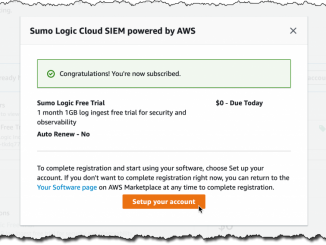
Sumo Logic Cloud SIEM Powered by AWS를 통한 멀티 클라우드 및 하이브리드 위협 차단 IT 보안 팀은 인프라와 애플리케이션에서 발생하는 상황을 실시간으로 파악해야 합니다. 보안 침해로 이어질 수 있는 예상치 못한 동작이나 패턴을 식별하기 위해 지속적으로 들어오는 정보에서 데이터를 찾고 상관 관계를 파악할 수 있어야 합니다. 이 프로세스를 단순화하고 자동화하기 위해 수년 동안 많은 솔루션이 구현되었습니다. 예를 들면 다음과 같습니다. 보안 정보 관리(SIM) 시스템은 분석에 필요한 로그 파일과 같은 데이터를 중앙 리포지토리로 수집합니다. 보안 이벤트 관리(SEM) 플랫폼은 데이터 검사와 로그 또는 이벤트의 해석을 단순화합니다. 수년 전에 이 두 가지 접근 방식은 정보 분석과 이벤트 해석을 모두 해결하기 위해 병합되었습니다. 이 보안 정보 및 이벤트 관리(SIEM) 플랫폼은 애플리케이션, 네트워크 하드웨어, 방화벽 및 엔드포인트 보호 도구와 같은 도메인별 보안 도구에서 생성된 보안 경고의 실시간 분석을 제공합니다. 오늘은 AWS 파트너가 만든 솔루션인 Sumo Logic Cloud SIEM powered by AWS를 소개하려고 합니다. Sumo Logic [ more… ]

No Image

Minions x Minecraft DLC now available in Minecraft Marketplace

2021-07-17 KENNETH 0

Minions x Minecraft DLC now available in Minecraft Marketplace Minions x Minecraft DLC has launched in Minecraft Marketplace, bringing to that world a look for every plan, ruse, or misadventure. They are always ready to go the extra mile. Minions aren’t the only new arrivals in the Overworld. A whole slew of villains, including all six of the Vicious 6, also known as the world’s most notorious collective of villains and breakout stars from the upcoming “Minions: Rise of Gru,” are here too. Head over to Minecraft.net to find out more. Source: Minions x Minecraft DLC now available in Minecraft Marketplace

No Image

Easier browser debugging with Developer Tools integration in Visual Studio Code

2021-07-17 KENNETH 0

Easier browser debugging with Developer Tools integration in Visual Studio Code If you’re debugging JavaScript in Visual Studio Code you probably have used either the Chrome Debugger or the Microsoft Edge Debugger extension. Neither are necessary any longer to debug as JavaScript debugging is now built-in to Visual Studio Code. This does not only mean that you can uninstall these extensions, but we also made debugging more convenient. To debug any project in either Chrome or Microsoft Edge, all you need to do is to start a session by pressing F5 or activating the debug icon in the menu bar and selecting “Run and debug”. Alternatively, you can also use the Visual Studio Code command palette and run the “Debug: Open Link” command. From there on you can choose to debug in Chrome, Edge or Node.js without having to install [ more… ]