No Image

A small business dreams big with help from Microsoft Store

2021-06-04 KENNETH 0

A small business dreams big with help from Microsoft Store At the height of the pandemic, when the ongoing economic downturn challenged businesses everywhere, two young women in Seattle did the unthinkable: They opened their own store. Was it crazy or brave? Definitely a little bit of both, say Kaitlin Uemura and her business partner, Kaitlin Madriaga. It’s been a whirlwind few months since the pair opened Sairen, a small boutique selling clothing and accessories in the city’s International District. They’ve had to deal with vandalism, slow foot traffic and a fitful economic recovery, but they’re pursuing a dream and growing it a little every day, betting that in the end, the risks will be worth it. Microsoft Store celebrated National Small Business Week in May by partnering with Sairen, providing its business consultation service and a range of software and devices to help Uemura and Madriaga streamline operations and free up time to be [ more… ]
Amazon Location Service – 새로운 경로 지정 및 인공 위성 이미지 기능 정식 출시

2021-06-03 KENNETH 0

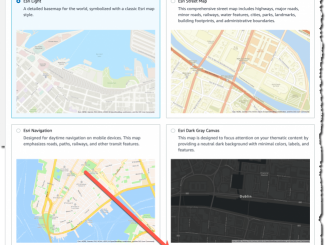
Amazon Location Service – 새로운 경로 지정 및 인공 위성 이미지 기능 정식 출시 2020년 12월, AWS는 위치 기반 기능을 포함한 웹 및 모바일 애플리케이션 구축을 시작할 수 있도록 Amazon Location Service를 평가판으로 출시했습니다. 오늘, 경로 지정 및 인공 위성 이미지와 같은 새로운 기능을 포함한 Amazon Location이 정식 출시되었음을 알리게 되어 정말 기쁩니다. 저는 15년 넘게 풀 스택 개발자로 일해 왔습니다. 그리고 대부분을 위치 기반 애플리케이션을 만드는 태스크를 맡았습니다. 위치 제공업체와 작업할 때 직면한 가장 큰 과제는 애플리케이션을 기존 애플리케이션 백엔드 및 프런트엔드에 통합하고 위치 제공업체와 데이터를 안전하게 공유하는 것이었습니다. 작년에는 Amazon Location이 평가판으로 출시되어 정말 기뻤습니다. 이 서비스를 사용하면 AWS 서비스와의 기본 통합을 통해 위치 기반 애플리케이션을 구축할 수 있습니다. 이 서비스는 Esri 및 HERE와 같은 신뢰할 수 있는 위치 공급업체를 사용하며, 고객은 데이터를 계속 제어할 수 있습니다. Amazon Location에는 다음 기능이 포함되어 있습니다. 맵: 이를 통해 위치 정보를 [ more… ]

Amazon Kinesis Data Analytics Studio 소개 – SQL, Python, Scala를 통한 스트리밍 데이터 처리 기능

2021-06-03 KENNETH 0

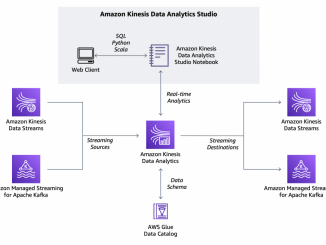
Amazon Kinesis Data Analytics Studio 소개 – SQL, Python, Scala를 통한 스트리밍 데이터 처리 기능 시기적절한 인사이트를 확보하고 비즈니스와 애플리케이션에서 들어오는 새로운 정보에 신속하게 대응하는 가장 좋은 방법은 스트리밍 데이터를 분석하는 것입니다. 스트리밍 데이터는 일반적으로 레코드 단위로 또는 슬라이딩 시간대에 걸쳐 순차적으로 증분 처리되어야 하며 상관 관계, 집계, 필터링 및 샘플링과 같은 다양한 분석에 사용될 수 있습니다. 오늘은 스트리밍 데이터를 더 쉽게 분석할 수 있는 Amazon Kinesis Data Analytics Studio를 소개합니다. 이제 Amazon Kinesis 콘솔에서 Kinesis 데이터 스트림을 선택하고 클릭 한 번으로 Apache Zeppelin 및 Apache Flink로 구동되는 Kinesis Data Analytics Studio 노트북을 시작하여 스트림 데이터를 대화형으로 분석할 수 있습니다. 마찬가지로, Amazon Managed Streaming for Apache Kafka 콘솔에서 클러스터를 시작하여 노트북을 시작하고 Apache Kafka 스트림 데이터를 분석할 수 있습니다. Kinesis Data Analytics Studio 콘솔에서 노트북을 시작하고 사용자 지정 소스에 연결할 수도 있습니다. 노트북에서 스트리밍 데이터와 상호 작용하고 SQL 쿼리와 Python [ more… ]

No Image

The Month in WordPress: May 2021

2021-06-03 KENNETH 0

The Month in WordPress: May 2021 It’s really fun to contribute to something larger than yourself. Matt Mullenweg’s words in “The Commons of Images” episode of the WP Briefing podcast exemplify the core philosophy of the WordPress project,  especially as we inch closer to the next major release (version 5.8). This post covers exciting updates from the month of May. WordPress turns 18 WordPress celebrated the 18th anniversary of its launch on May 27, 2021. To celebrate 40+ releases and WordPress’ support of 40% of the web, the team released 40 milestones to celebrate the anniversary of the software. Here’s to the next 18 and beyond!  CC Search joins WordPress and is renamed to Openverse Creative Commons Search has officially joined the WordPress project. Creative Commons Search (CC Search) is a CC0 image search engine with over 500 million openly [ more… ]

Improving font rendering in Microsoft Edge

2021-06-03 KENNETH 0

Improving font rendering in Microsoft Edge Today we are excited to announce improved font rendering in the latest Canary builds of Microsoft Edge on Windows. We have improved the contrast enhancement and gamma correction to match the quality and clarity of other native Windows applications. Font rendering will also now respect user ClearType Tuner settings when applying text contrast enhancement and gamma correction. What’s New? In the latest Canary builds, we now have support for applying the system settings for contrast enhancement and gamma correction of text. You can enable this with the edge://flags#edge-enhance-text-contrast flag. To experiment with different values, run the ClearType Text Tuner (search for “Adjust ClearType text” in the Start menu). Note that Edge must be restarted whenever the settings are changed, and that only the settings for your primary monitor are used. You can see the effect [ more… ]