No Image

New Windows devices at CES elevate modern work and gaming, showcase tech for good

2021-01-14 KENNETH 0

New Windows devices at CES elevate modern work and gaming, showcase tech for good Coming off a year that brought everyone’s priorities into focus, the all-digital CES 2021 was a powerful reflection of the importance of devices in peoples’ daily lives. The digital conference gathered global brands online to share ideas and introduce products that will define the future of the tech industry. This week, we’ve seen innovative PCs, gaming consoles, tablets, Microsoft Teams Room systems and other devices that will make it even easier to work, learn, shop, stream, play and connect in any scenario. Devices designed to empower people This year’s event was the perfect illustration of Microsoft’s belief that modern tech empowers everyone to do more. The intelligent cloud and the intelligent edge are not only transforming how we work, but also serving as a force for [ more… ]
CES 2021: Latest lineup from ASUS includes ROG Flow X13 and ZenBook Pro Duo with ScreenPad Plus

2021-01-14 KENNETH 0

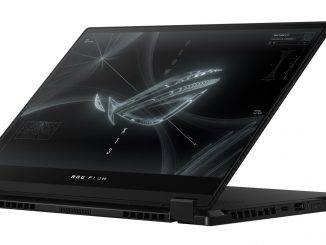
CES 2021: Latest lineup from ASUS includes ROG Flow X13 and ZenBook Pro Duo with ScreenPad Plus At CES 2021, ASUS announced its latest lineup of laptops, displays and entertainment solutions at its “Be Ahead” virtual launch event. Among the Windows 10 devices unveiled: The ROG Flow X13, the first 2-in-1 convertible ROG gaming laptop, and the ROG XG Mobile, an ultraportable external GPU that augments the Flow X13’s gaming performance and connectivity. The Flow X13 arrives in an ultraslim 13-inch body with up to an 8-core AMD Ryzen 9 5980HS CPU and dedicated GeForce GTX 1650 GPU, which provides the performance needed for demanding workloads and enables strong performance in the latest games. Up to 32GB of memory provides smooth multitasking. A PCIe SSD provides high performance and up to 1TB of capacity, giving users ample storage space for games and professional portfolios. A 360-degree hinge maximizes touchscreen viewing and interaction, quickly flipping from laptop mode into positions for gaming, drawing and presenting. You can also take advantage [ more… ]

Announcing Windows 10 Insider Preview Build 21292

2021-01-14 KENNETH 0

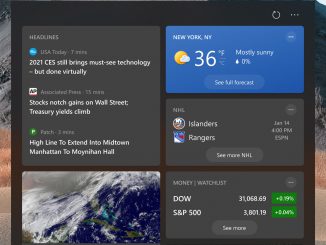
Announcing Windows 10 Insider Preview Build 21292 Hello Windows Insiders, today we are releasing Windows 10 Insider Preview Build 21292 (RS_PRERELEASE) to Windows Insiders in the Dev Channel. This build is being offered to ALL Insiders in the Dev Channel. All Insiders in the Dev Channel will now receive the same build going forward. What’s new in Build 21292 Improvements to news and interests on the taskbar Thanks for all the feedback on news and interests, which we announced in last week’s blog post. The team has been reading it all! We’re continuing to improve the experience and this week are happy to announce a handful of fixes: We fixed multiple issues impacting performance and reliability. We fixed an issue where an empty flyout would be shown after opening news and interests. We fixed an issue where the text on [ more… ]

No Image

How to investigate Microsoft Edge’s memory usage on Windows

2021-01-14 KENNETH 0

How to investigate Microsoft Edge’s memory usage on Windows Performance is essential to your success, which makes it core to ours. To help ensure the browser doesn’t slow you down, we always keep performance in mind as we continue to improve Microsoft Edge. However, for the times that your browser isn’t running as expected, we want to help you understand how Microsoft Edge is using the resources on your device and when Microsoft Edge’s resource usage is unusually high so you can get back to what you want to get done. How Microsoft Edge thinks about memory usage The memory usage of a browser can be looked at in many ways and is dependent on several factors. Here, for Microsoft Edge, the memory metrics that we are most interested in are commit and private working set. Commit is the total amount of private memory allocations made by a process. Each process’s commit is separate, [ more… ]

ISMS-P 를 위한 AWS Config 규정 준수 팩 사용하기

2021-01-13 KENNETH 0

ISMS-P 를 위한 AWS Config 규정 준수 팩 사용하기 AWS Config 서비스는 AWS 리소스 구성을 측정, 감사 및 평가할 수 있는 서비스입니다. AWS Config 서비스를 이용해 한국인터넷 진흥원(KISA)의 정보보호 및 개인정보보호 관리체계 인증(ISMS-P) 기준에 맞춰 AWS 서비스의 컴플라이언스 상태를 진단하고 관리 할 수 있는 AWS Config 규정 준수 팩(Conformance Pack)이 출시 되었습니다. AWS Config 규정 준수 팩(Conformance Pack)이란? AWS Config 규정 준수 팩은 AWS 계정과 단일 리전 또는 AWS Organization으로 조직된 전체 계정에 대해 배포 할 수 있는 AWS Config 규칙 및 문제 해결(Remediation) 작업의 모음입니다. 300+의 AWS Config 관리형 규칙을 이용해 구성되어 있으며 ISMS, PCI DSS, HIPAA 등의 컴플라이언스 요건들과 AWS Identity and Access Management, Amazon S3, Amazon EC2, Amazon DynamoDB 등 서비스 운영에 대한 모범 사례 그리고 Logging, Monitoring, Serverless, AI/ML, Security, Identity and Compliance 서비스, Data Lake 등의 운영에 대한 모범 사례에 대한 규정 준수 팩을 제공하고 [ more… ]