No Image

Announcing Windows 11 Insider Preview Build 25336

2023-04-08 KENNETH 0

Announcing Windows 11 Insider Preview Build 25336 Hello Windows Insiders, today we are releasing Windows 11 Insider Preview Build 25336 to the Canary Channel. This build will also be offered to Windows Insiders with Arm64 devices. REMINDER: As builds released to the Canary Channel are “hot off the presses,” we will offer limited documentation for builds flighted to the Canary Channel (no known issues for example), but we will not publish a blog post for every flight – only when new features are available in a build. And like the previous Canary Channel build, this build has a few new features and changes to document. Changes and Improvements [Settings] Improved the performance of search within Settings. Customers with 2 or more discrete graphics adapters with no integrated graphics can now choose which of the discrete graphics adapters is considered high-performance. [ more… ]
Introducing the “Browser essentials” feature in Microsoft Edge

2023-04-07 KENNETH 0

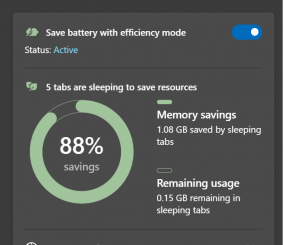
Introducing the “Browser essentials” feature in Microsoft Edge You expect your browser to be fast, efficient, and safe every time you browse. Microsoft Edge has been leading in performance and security innovation with features like Sleeping Tabs, Efficiency Mode, Startup Boost and the highest rated protection against phishing and malware attacks. You should never have to sacrifice safety or performance when you’re using a web browser. However, we know it can be difficult to understand whether a browser is really giving you a great experience. For that reason, we’ve improved upon the previous Performance Hub and created Browser essentials to reveal how Microsoft Edge’s performance and security features make your everyday browsing fast, efficient, and safe. Browser essentials ships to Canary users and will roll out to a portion of Dev channel users beginning with Edge 112. Performance When you [ more… ]

Edge features to help you stay organized and power your productivity

2023-04-07 KENNETH 0

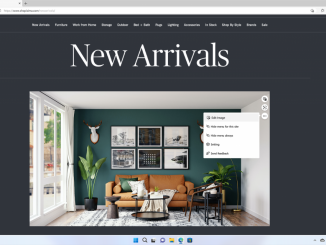
Edge features to help you stay organized and power your productivity Life seems to be moving at a faster pace, with demands for our time growing and multitasking being the norm at home and at work. Here at Microsoft Edge, we understand the crucial role that a web browser plays in your online life, and we strive to build features that help you make the most of your time. Yesterday, we announced the limited public preview of Edge Workspaces, which allows you to browse the web in a shared space along with your friends and family to get more done, together. Today, we are excited to share more of what is new in Edge to help you stay organized and productive. First, Edge is now the first and only browser with an integrated AI image generator. We are also excited [ more… ]

Making Better Decisions with Deep Service Insight from NGINX Ingress Controller

2023-04-06 KENNETH 0

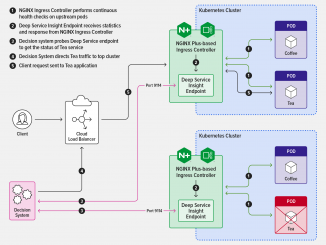
Making Better Decisions with Deep Service Insight from NGINX Ingress Controller We released version 3.0 of NGINX Ingress Controller in January 2023 with a host of significant new features and enhanced functionality. One new feature we believe you’ll find particularly valuable is Deep Service Insight, available with the NGINX Plus edition of NGINX Ingress Controller. Deep Service Insight addresses a limitation that hinders optimal functioning when a routing decision system such as a load balancer sits in front of one or more Kubernetes clusters – namely, that the system has no access to information about the health of services running in the clusters. This prevents it from routing traffic only to healthy pods, which potentially exposes your users to outages and errors like 404 and 500. Deep Service Insight eliminates that problem by exposing the health status of backend service pods (as collected by NGINX Ingress [ more… ]

No Image

Microsoft Edge Workspaces public preview is now available

2023-04-06 KENNETH 0

Microsoft Edge Workspaces public preview is now available Last fall, at Ignite, we announced the enterprise public preview of Microsoft Edge Workspaces. Since then, we’ve been hard at work to make it available more broadly and allow you to try Edge Workspaces in your home life.  Today, we are excited to announce that we’re opening Edge Workspaces for a limited public preview. We want to continue to build out this game-changing, collaborative feature, and we cannot do it without valuable feedback from Edge users. Today, we want to share what you can do with Edge Workspaces and how it can help you get more done, together. We’ll also share how you can join the public preview and be one of the first to try Edge Workspaces. Stay focused At Microsoft Edge, helping you get more done and multitask smarter is [ more… ]