No Image

NGINX Unit 1.10.0 Is Now Available

2019-09-17 KENNETH 0

NGINX Unit 1.10.0 Is Now Available Summer’s gone, so it’s time to forfeit the halcyon tranquility and get some working attitude on. The NGINX Unit team has recently presented our first two‑digit version, NGINX Unit 1.10.0; let’s page through the recent developments and shed some light on our plans for the future. Routing Advancements In our two latest releases, some major effort went into extending the request routing capabilities that were initially introduced in NGINX Unit 1.8.0. Version 1.9.0 included essential support for arguments, headers, and cookies in matching clauses, whereas NGINX Unit 1.10.0 added scheme‑based routing to the mix. A few examples: “match”: { “host”: “www.example.com”, “arguments”: { “mode”: [“mobile”, “desktop”], “ui”: “!full” } } This condition matches queries like www.example.com/?mode=mobile and www.example.com/?mode=desktop&ui=compact, but not www.example/com/?mode=desktop&ui=full. “match”: { “headers”: [ { “Accept-Encoding”: “*gzip*”, “User-Agent”: “Mozilla/5.0*” }, { “User-Agent”: “curl*” } ] [ more… ]

New Ways to do Screen Capture

2019-09-17 KENNETH 0

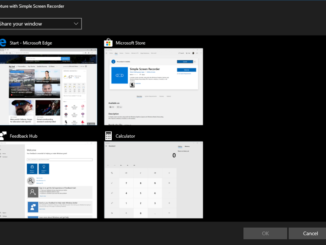
New Ways to do Screen Capture Screen capture supports scenarios like screen recording for eLearning, screen sharing for collaboration, game streaming, remote diagnostics, and taking screen shots for visual comparison or editing. The new UWP WindowsGraphicsCapture APIs provide a modern, performant way of capturing screen contents in Win32 and UWP applications. The Arrival of WindowsGraphicsCapture WindowsGraphicsCapture APIs first shipped in the Windows 10 April 2018 Update (1803). These APIs were built for developers who depended on screen capture functionality for their modern applications without depending on restricted capabilities. These APIs enable capture of application windows, displays, and environments in a secure, easy to use way with the use of a system picker UI control. How WindowsGraphicsCapture works When an application makes a capture request, it is presented to the user in the form of a control where the user can [ more… ]

AWS 주간 소식 모음 – 2019년 9월 16일

2019-09-16 KENNETH 0

AWS 주간 소식 모음 – 2019년 9월 16일 안녕하세요! 여러분~ 매주 월요일 마다 지난 주에 업데이트된 국내 AWS관련 콘텐츠를 정리해 드립니다. AWS 클라우드에 대한 새로운 소식을 확인하시는데 많은 도움 되시길 바랍니다. 혹시 빠지거나 추가할 내용이 있으시면, 저에게 메일 주시면 추가 공유해 드리겠습니다. AWS코리아 블로그 Amazon Quantum Ledger Database(QLDB) – 서버리스 원장 데이터베이스 정식 출시 (2019-09-14) [AWS Hero 특집] 이메일 인증 작업 서버리스 앱으로 구성하기 (2019-09-11) AWS Re:cruit 2019 – 네트워킹 행사에 여러분을 초대합니다! (2019-09-10) Amazon CloudWatch Container Insight를 통한 컨테이너 기반 앱 모니터링 기능 출시 (2019-09-09) Amazon EFS Infrequent Access을 통한 스토리지 비용 최적화 – 최대 92% 비용 절감 (2019-09-09) AWS 추천 콘텐츠 CloudWatch 이상 동작 탐지 기능 사용하기 #1 (2019-09-10) AWS 신규 기능(영문) AWS Elemental MediaStore Now Supports Stale Manifest Deletion (2019-09-14) AWS Storage Gateway adds Amazon CloudWatch logging and metrics for File Gateway (2019-09-14) AWS Elemental MediaLive Now [ more… ]

Amazon Quantum Ledger Database(QLDB) – 서버리스 원장 데이터베이스 정식 출시

2019-09-14 KENNETH 0

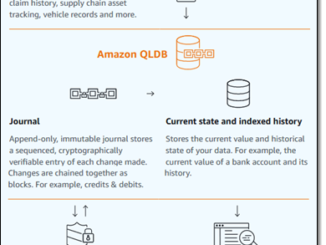
Amazon Quantum Ledger Database(QLDB) – 서버리스 원장 데이터베이스 정식 출시 다양한 데이터 유형, 쿼리 모델, 인덱싱 옵션, 확장성에 대한 기대치 및 성능 요구 사항을 고려할 때, 데이터베이스는 절대 획일적으로 적용 가능한 제품이 아닙니다. AWS에는 다양한 AWS 데이터베이스  선택 옵션이 있으며 각 서비스는 서로 다른 유형의 애플리케이션 요구 사항을 충족하도록 특별히 설계되었습니다. 이 중에서도 AWS 데이터베이스 제품군의 신규 멤버인 Amazon Quantum Ledger Database(QLDB)는 작년 리인벤트에서 처음 발표되어 미리 보기 형태로 공개하였습니다. 이제 Amazon QLDB를 정식 출시합니다. Amazon QLDB 소개 원장 데이터베이스인 Amazon QLDB는 저장된 데이터에 대한 신뢰할 수 있는 데이터 원본(레코드 시스템이라고도 함)을 제공하도록 설계되었습니다. QLDB에는 커밋된 모든 데이터 변경 사항의 완전하고 변경 불가능한 기록이 유지되며 이러한 기록은 업데이트, 변경 또는 삭제가 불가능합니다. QLDB는 기록 데이터에 대한 PartiQL SQL 쿼리를 지원하며 기록의 정확성 및 적법성을 암호로 확인하는 데 사용할 수 있는 API도 제공합니다. 이러한 기능 덕에 QLDB는 뱅킹 및 금융, 전자상거래, [ more… ]

No Image

Global Server Load Balancing with NS1 and NGINX Plus

2019-09-14 KENNETH 0

Global Server Load Balancing with NS1 and NGINX Plus Global server load balancing (GSLB) is the practice of balancing load (connections or requests) across two or more distinct data centers or points of presence (PoPs). It is used to achieve several goals: Improving high availability (HA) – Route traffic away from a failed data center to operational ones. Reducing latency –Route each client to the data center that is closest to it. Improving performance by balancing load – Route connections to the data center that has the most capacity. Managing cost –Route traffic to the lowest‑cost data center. Most commonly used in a ‘cloud‑bursting’ scenario, when a higher‑cost data center is brought online only when its capacity is required. GSLB is generally implemented by managing the DNS resolution process; when a client makes a DNS lookup, it is given one or more IP addresses [ more… ]