
GPU 딥러닝 모델 학습에 있어서 Amazon EC2 스팟 인스턴스의 활용법

2019-05-31 KENNETH 0

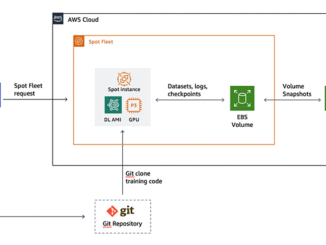
GPU 딥러닝 모델 학습에 있어서 Amazon EC2 스팟 인스턴스의 활용법 여러분이 데이터 세트를 수집하고, 심층 신경망 아키텍처를 설계하고, 학습 루틴 코드를 작성을 완료 하셨다면 지금부터는 강력한 GPU 인스턴스를 사용해 여러 epoch에 걸쳐 대규모 데이터 세트를 이용한 학습을 실행할 차례입니다. 여러분은 이미 NVIDIA Tesla V100 GPU에 기반한 Amazon EC2 P3 인스턴스가 컴퓨팅 집약적인 딥러닝 학습 작업에 적합하다는 사실을 알고 있지만 예산이 빠듯한 관계로 가능한한 학습 비용은 낮추고 싶습니다. 몇 시간 또는 며칠에 걸쳐 학습 작업을 실행하는 딥러닝 연구자 및 개발자라면, 스팟 인스턴스 요금을 통해 훨씬 경제적인 비용으로 고성능 CPU를 이용할 수 있습니다. 스팟 인스턴스를 사용하면 온디맨드 요금에 비해 대폭 할인된 가격으로 여분의 Amazon EC2 컴퓨팅 용량에 액세스할 수 있습니다. 인스턴스 및 리전별 최근 요금 목록을 보려면 스팟 인스턴스 어드바이저를 방문하십시오. 스팟 인스턴스와 온디맨드 인스턴스 사이의 주요 차이점을 알아보려면 이 Amazon EC2 사용 설명서를 검토해 보시기 바랍니다. 스팟 인스턴스는 딥러닝 워크플로우에 적합하지만, 온디맨드 [ more… ]

No Image

Ask NGINX | May 2019

2019-05-31 KENNETH 0

Ask NGINX | May 2019 Every month, we take a moment to share the expertise of our team, and answer a number of great questions we’ve received from both our customers and open source users. These questions range from how to use our products in a variety of use cases to how to effectively integrate third‑party tools and platforms with NGINX. These answers come from our experts including technical architects, systems engineers, and our award‑winning customer support specialists. How do I perform health checks for UDP servers in a load‑balanced upstream server group? Both NGINX Open Source and NGINX Plus perform passive UDP health checks by default: if a UDP server generates an error or times out in response to just one request, it is marked unavailable and removed from the load‑balancing rotation for ten seconds. You can change the defaults [ more… ]

Xbox head Phil Spencer shares approach to PC gaming

2019-05-31 KENNETH 0

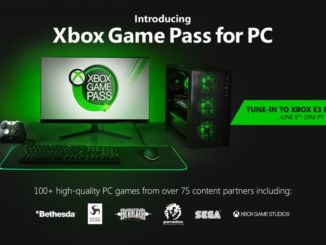
Xbox head Phil Spencer shares approach to PC gaming In a blog post on Xbox Wire, Phil Spencer, head of Xbox, shares share steps Microsoft is taking to contribute to the thriving PC gaming ecosystem: introducing Xbox Game Pass designed for PC players and making Xbox Game Studios PC games available in multiple stores (including Microsoft Store on Windows) at their launch. Xbox Game Pass for PC will give players unlimited access to a curated library of more than 100 high-quality PC games on Windows 10. Microsoft is working with over 75 developers and publishers to bring PC content to the service. Xbox Game Pass for PC members will also receive discounts in the Microsoft Store on Windows of up to 20% on games currently in the library and up to 10% off related game DLC and add-ons. “We want to bring players [ more… ]

Announcing Windows 10 Insider Preview Build 18908

2019-05-30 KENNETH 0

Announcing Windows 10 Insider Preview Build 18908 Hello Windows Insiders, today we are releasing Windows 10 Insider Preview Build 18908 (20H1) to Windows Insiders in the Fast ring. IMPORTANT: As is normal with builds early in the development cycle, these builds may contain bugs that might be painful for some. If you take this flight, you won’t be able to switch Slow or Release Preview rings without doing a clean-install on your PC. If you wish to remain on 19H1, please change your ring settings via Settings > Update & Security > Windows Insider Program *before* taking this flight. See this blog post for details. If you are looking for a complete look at what build is in which Insider ring – head on over to Flight Hub. You can also check out the rest of our documentation here including [ more… ]

AWS RoboMaker용 ROS 애플리케이션 빌드 및 번들링 기술 활용기

2019-05-29 KENNETH 0

AWS RoboMaker용 ROS 애플리케이션 빌드 및 번들링 기술 활용기 AWS는 클라우드 기반 로봇 서비스인 AWS RoboMaker  개발을 시작하면서, 어떻게 모든 오픈 소스 로봇 운영체제인 ROS 애플리케이션을 쉽게 실행할 수 있을지 고민하였습니다. 대부분 로봇 애플리케이션은 수많은 종속 관계로 서로 연관된 다양한 패키지의 거대한 결합체라고 할 수 있습니다. 시뮬레이션이 결합됨에 따라 이 종속 관계의 목록도 늘어납니다. 많은 조사와 검토를 통해 appimage, flatpak, snapcraft에서 영감을 얻어 로컬 개발 환경과 AWS 서비스에서 실행할 수 있는 단일 파일 형식을 만들어냈습니다. 이 형식을 번들이라고 합니다.어떤 종류의 패키징 아티팩트를 설계할지 결정되자, 아티팩트를 손쉽게 생성할 수 있는 명령줄 도구가 필요했습니다. 기존 ROS 생태계에 완벽하게 적용되는 도구라야 했습니다. 그래서 가장 뛰어난 최신 ROS 빌드 도구인 colcon을 기반으로 만들기로 결정했습니다. Colcon을 사용하면 ROS1 및 ROS2 애플리케이션을 빌드할 수 있습니다. 또한 이 도구는 확장성이 매우 뛰어나고, 필요한 여러 가지 중요 기능을 기본적으로 제공합니다. 이 문서에서는 기존 ROS 빌드 도구에 대해 살펴보고, [ more… ]