
No Image

Releasing Windows 11 Build 22000.1639 to the Release Preview Channel

2023-02-17 KENNETH 0

Releasing Windows 11 Build 22000.1639 to the Release Preview Channel Hello Windows Insiders, today we’re releasing Windows 11 Build 22000.1639 (KB5022905) to Insiders in the Release Preview Channel on Windows 11 (original release).   This update includes the following improvements: New! We added an advanced auto-learning feature for facial recognition. We fixed an issue that stopped hyperlinks from working in Microsoft Excel. We fixed an issue that affected the Color filters setting. When you selected Inverted, the system set it to Grayscale instead. We fixed an issue that affected the Appx State Repository. When you removed a user profile, the cleanup was incomplete. Because of that, its database grew as time passes. This growth might have caused delays when users signed into multi-user environments like FSLogix. We provided support for the United Mexican States’ daylight-saving time change order for 2023. [ more… ]
No Image

Releasing Windows 10 Build 19045.2670 to Release Preview Channel

2023-02-17 KENNETH 0

Releasing Windows 10 Build 19045.2670 to Release Preview Channel Hello Windows Insiders, today we are releasing Windows 10 22H2 Build 19045.2670 (KB5022906) to the Release Preview Channel for those Insiders who are on Windows 10, version 22H2. This update includes the following improvements: We fixed an issue that stopped hyperlinks from working in Microsoft Excel. We fixed an issue that affected the Appx State Repository. When you removed a user profile, the cleanup was incomplete. Because of that, its database grew as time passes. This growth might have caused delays when users signed into multi-user environments like FSLogix. We provided support for the United Mexican States’ daylight-saving time change order for 2023. We fixed a resource conflict issue between two or more threads (known as a deadlock). This deadlock affected COM+ applications. We fixed an issue that affected IE mode. [ more… ]

No Image

Announcing Windows 11 Insider Preview Build 22621.1325 and 22623.1325

2023-02-17 KENNETH 0

Announcing Windows 11 Insider Preview Build 22621.1325 and 22623.1325 Hello Windows Insiders, today we are releasing Windows 11 Insider Preview Build 22621.1325 and Build 22623.1325 (KB5022914) to the Beta Channel. Build 22623.1325 = New features rolling out. Build 22621.1325 = New features off by default. REMINDER: Insiders who were previously on Build 22622 will automatically get moved to Build 22623 via an enablement package. The enablement package artificially increments the build number for the update with new features getting rolled out and turned on to make it easier to differentiate from devices with the update with features off by default. This approach is being used for the Beta Channel only and is not indicative of any changes or plans for final feature rollouts. Insiders who landed in the group with new features turned off by default (Build 22621.xxxx) can check for [ more… ]

No Image

Introducing the Minecraft x Crocs collection

2023-02-17 KENNETH 0

Introducing the Minecraft x Crocs collection Now available to order online, the new Minecraft x Crocs footwear collection features five pairs of Crocs and two blocky sets of Minecraft-themed Jibbitz charms. The charms come in two different sets: a five-pack of flat charms featuring Steve, Alex, an Enderman, a creeper and a pig, and an exclusive 13-pack of 3D charms that includes various characters, mobs and blocks. And in addition to the physical Crocs, you can also download your very own pair of Minecraft x Crocs in the Dressing Room, for free. Simply launch Minecraft: Bedrock Edition and open the Character Creator to claim the item. Head over to Minecraft.net to find out more and see the Crocs close-up. Source: Introducing the Minecraft x Crocs collection

AWS 비하인드 스토리 – Amazon DynamoDB UpdateTable 속도 향상

2023-02-17 KENNETH 0

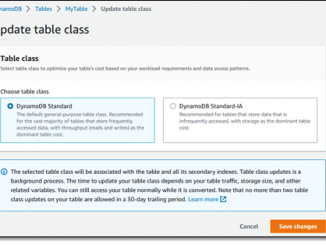
AWS 비하인드 스토리 – Amazon DynamoDB UpdateTable 속도 향상 우리는 종종 AWS의 혁신 속도에 대해 이야기하고 그 결과를 이 블로그, AWS의 새로운 소식 페이지 및 주간 AWS on Air 방송에서 공유합니다. 오늘은 약간 다른 유형의, 무대 뒤에서 일어나는 혁신에 대해 말씀드리고자 합니다. AWS 고객은 각자가 다른 조합의 서비스를 고유한 방식으로 사용하고 있습니다. 모든 서비스는 계측 및 모니터링되고 서비스의 설계, 구축, 운영, 확장 및 발전을 담당하는 팀은 모든 결과 지표에 지속적으로 주의를 기울입니다. 지표는 서비스가 어떻게 사용되고 부하 상태에서 어떻게 작동하는지에 대한 인사이트를 제공하며, 주로 가용성 및 성능 향상과 비용 절감을 추구하기 위한 최적화 영역을 부각시켜 줍니다. 개선이 필요한 부분이 파악되면 팀이 계획을 수립하고 사전 프로덕션 환경에서 변경 사항을 적용 및 테스트한 다음 여러 AWS 리전에 배포합니다. 이러한 작업은 지금까지 일상적으로, 외부로 드러내는 일 없이 진행되어 왔습니다. AWS의 모든 측면은 고객이 아무런 행동을 취하지 않아도 점점 더 개선되어 가고 있습니다. DynamoDB [ more… ]