
No Image

Windows 10 SDK Preview Build 17754 available now!

2018-09-12 KENNETH 0

Windows 10 SDK Preview Build 17754 available now! Today, we released a new Windows 10 Preview Build of the SDK to be used in conjunction with Windows 10 Insider Preview (Build 17754 or greater). The Preview SDK Build 17754 contains bug fixes and under development changes to the API surface area. The Preview SDK can be downloaded from developer section on Windows Insider. For feedback and updates to the known issues, please see the developer forum. For new developer feature requests, head over to our Windows Platform UserVoice. Things to note: This build works in conjunction with previously released SDKs and Visual Studio 2017. You can install this SDK and still also continue to submit your apps that target Windows 10 build 1803 or earlier to the store. The Windows SDK will now formally only be supported by Visual Studio 2017 and greater. You can download [ more… ]
No Image

Announcing Windows 10 Insider Preview Build 17758

2018-09-12 KENNETH 0

Announcing Windows 10 Insider Preview Build 17758 Hello Windows Insiders! Today, we are releasing Windows 10 Insider Preview Build 17758 (RS5) to Windows Insiders in the Fast ring. What’s new in Storage Sense Starting with Windows 10, Storage Sense has embarked on a path to keep your storage optimized. We’re making continuous improvements in every feature update. From Build 17720 and later, we’re adding a new capability and making a few changes to Storage Sense’s behavior. Storage Sense now has the capability to automatically free up disk space by making older, unused, locally available files be available online-only. Learn more in the Storage Sense blog post here. General changes, improvements, and fixes for PC The build watermark at the lower right-hand corner of the desktop is no longer present in this build. This does not mean this is the final [ more… ]

No Image

Video: Acrobat soars to another level with digital pen

2018-09-12 KENNETH 0

Video: Acrobat soars to another level with digital pen When she’s not working, Marta Luis Burguete likes to hang out – upside down from the ceiling, as an aerial acrobat. In a new video tutorial, the Microsoft product specialist brings together her passion and her profession to show how to use a digital pen, a Surface Pro and Microsoft Office to edit a flyer, script and stage floor plan for an Aerial Circus School show. Check out the video tutorial below, in which she demonstrates how to use the digital pen to edit these plans and promotions for the show. She uses PowerPoint to edit the flyer with ink to text, ink to shape and ink replay, as well as to create the stage floor plan using the ruler, segment eraser and ink replay. In Word, she uses ink editor [ more… ]

Windows 10 Tip: Set up Windows Hello from your lock screen

2018-09-11 KENNETH 0

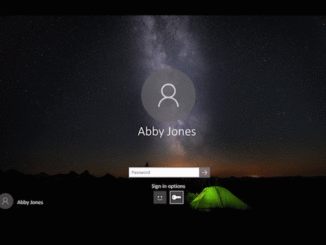
Windows 10 Tip: Set up Windows Hello from your lock screen If you’re interested in setting up Windows Hello to sign in faster and more securely, you can do so, thanks to the Windows 10 April 2018 Update. Previously Microsoft account users had to navigate deep into Settings to find Windows Hello. Now, you can set up Windows Hello Face, Fingerprint or PIN straight from your lock screen by clicking the Windows Hello tile under Sign-in options. Check it out in action: This feature is only available for users who use their Microsoft Account to sign in to Windows. It is not available for work or school accounts, or local accounts.   If you like this, check out more Windows 10 Tips. Source: Windows 10 Tip: Set up Windows Hello from your lock screen

Data analyst with ALS types with his eyes to help modernize companies

2018-09-10 KENNETH 0

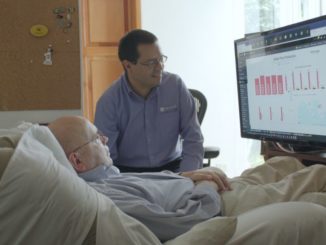
Data analyst with ALS types with his eyes to help modernize companies Otto Knoke, who has been living with ALS for two decades, harnesses his data skills to help transform companies and modernize industries with the help of Eye Control, a feature in Windows 10 that allows him to type with his eyes. Otto Knoke and his friend and former colleague, Juan Alvarado, discuss a Power BI report Knoke created using eye-tracking software for Windows 10. The 60-year-old data analyst calls himself the “oldest nerd of Guatemala” and is well-known in the country’s business community, especially after he helped update the banking industry by bringing ATMs there 20 years ago. But even as his career was blossoming, his muscles were beginning to fail him. In 1998, Knoke was diagnosed with amyotrophic lateral sclerosis, or ALS, and was told he had [ more… ]