Register now for Microsoft Edge Web Summit 2017

2017-07-25 KENNETH 0

Register now for Microsoft Edge Web Summit 2017 Registration is now open for Microsoft Edge Web Summit 2017. Join the Microsoft Edge team in Seattle for a jam-packed day of energetic technical sessions looking at what’s new, and what’s next, for the web on Windows. Space is limited and reservations are on a first-come, first-served basis, so book your seat today! Microsoft Edge Web Summit is a free conference presented by the engineers building Microsoft Edge. The main track consists of 14 jam-packed technical sessions, covering everything from performance, accessibility, and test guidance, to brand-new tools and APIs for building Progressive Web Apps on Windows, adding payments and biometric authentication to your sites, and building modern layouts with new CSS features like CSS Grid. This year, we’re introducing a new Hallway Track, where you can meet with engineers from across Microsoft to solve real [ more… ]


No Image

Community Standup with Kevin Gallo

2017-07-25 KENNETH 0

Community Standup with Kevin Gallo Kevin Gallo will be live on Channel 9 with Seth Juarez on July 26th, 2017 at 9:30am PST. Kevin will be providing updates to the state of the Windows SDK inside Windows 10 Falls Creators Update since everyone last chatted with him at Microsoft Build 2017. As always, we’ll be answering live questions afterwards. A few of the topics Kevin and Seth will be discussing are the Windows 10 Fall Creators Update SDK, .NET Standard 2.0, Fluent Design, Microsoft Graph with the Activity API and more. Over time, we’ll hold more frequent community standups to provide additional transparency on what we are building out, and clarity on why we are building them. The community standups will not only be with just Kevin, but the entire Windows development team as well. We’ll be testing different streaming [ more… ]

Windows 10 Tip: Get started with Windows Help Me Choose

2017-07-25 KENNETH 0

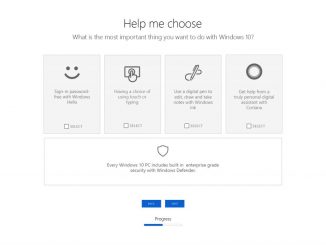
Windows 10 Tip: Get started with Windows Help Me Choose We know there are a lot of great options when it comes to Windows 10 PCs, and narrowing it down can be overwhelming. That’s why the Windows team created Help Me Choose: an interactive tool on Windows.com that makes it easy to find the best PC that will meet your needs. We designed Windows to be the place you love to create and play, with the tools to help you make your mark on the world –  whether you’re a student, gamer, artist or mobile professional. Here’s how to use Help Me Choose: Shop for a new Windows 10 PC Simply click on “Shop for a new Windows 10 PC,” and you’ll be asked a couple questions about how you’ll be using your PC, and what features are most important [ more… ]

No Image

USN-3353-3: Heimdal vulnerability

2017-07-25 KENNETH 0

USN-3353-3: Heimdal vulnerability Ubuntu Security Notice USN-3353-3 24th July, 2017 heimdal vulnerability A security issue affects these releases of Ubuntu and its derivatives: Ubuntu 12.04 LTS Summary Heimdal could allow unintended access to network services. Software description heimdal – Heimdal Kerberos Network Authentication Protocol Details USN-3353-1 fixed a vulnerability in Heimdal. This update providesthe corresponding updade for Ubuntu 12.04 ESM. Original advisory details: Jeffrey Altman, Viktor Dukhovni, and Nicolas Williams discovered that Heimdal clients incorrectly trusted unauthenticated portions of Kerberos tickets. A remote attacker could use this to impersonate trusted network services or perform other attacks. Update instructions The problem can be corrected by updating your system to the following package version: Ubuntu 12.04 LTS: libkrb5-26-heimdal 1.6~git20120311.dfsg.1-2ubuntu0.2 To update your system, please follow these instructions: https://wiki.ubuntu.com/Security/Upgrades. After a standard system update you need to restart any applicationsusing Heimdal libraries to [ more… ]

No Image

웹사이트 보안 개발 가이드 20160421

2017-07-25 KENNETH 0

웹사이트 보안 개발 가이드 20160421 중요 취약점 및 조치사항에 대한 내용을 듣고 나서… 뭐랄까.. 이렇게 알려주면 좋지 않을까 싶었던… 내용으로 정리해서   파일업로드 취약점 외부의 공격자가 서버에 (악성)파일을 업로드 하고 실행하는 형태의 공격 wp의 경우 PATH가 정해져 있기 때문에 wp-content/uploads 디렉토리에 대해 php를 구동불가능 하도록 처리하면 도움이 될듯 개발을 한다면 upload 되는 파일의 이름을 임의로 변경해서 (예를들어 : badfile.sh 라는 이름의 파일을 업로드 하면 XDAFDFafLKHIODAF 뭐 이런식으로 ㅋ) 유추하지 못하도록 하는 것도 방법이라고….   SQL 인젝션 Error Based Injection : error 메세지를 이용한 유추 Blind SQL Injection : 쿼리 조건에 따른 결과 화면으로 유추   INPUT 개체에 대해 문자를 검수 하는 형태로.. GET, POST 등으로 넘기는 입력값을 체크하는 옵션을 추가하여.. 가능한 부분에 대해서는 특수문자를   하아 쓰기 귀찮구나.. 1년 전에 이 글을 작성하다가 잠시 깜빡 했던 모양이다…. 임시글 항목에 들어있다니… 언젠가 이어서 쓰겠다능…