Windows 10 Tip: Get started with the Photos app and Sway

2017-07-18 KENNETH 0

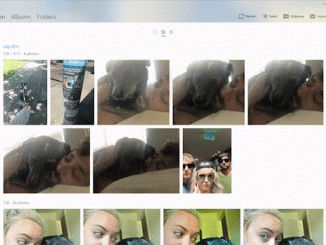
Windows 10 Tip: Get started with the Photos app and Sway The Photos app automatically creates albums for you based on when and where they were taken, but if you want to edit an existing album or create a new one, simply select albums, the album you want and then click Edit. You can create a new album by selecting Albums, Create new Album and then selecting the photos you’d like to include. From there you can edit the title, add or remove photos and change the cover photo. Easily share all the awesome photos you’ve catalogued right from the Photos app by clicking the Share the Album button. Transform your album into an interactive story in minutes with Sway To get started, simply open your album, and select Share and then Create a Sway. After the album is uploaded [ more… ]

[도서] 블로그 투잡 됩니다

2017-07-17 KENNETH 0

[도서] 블로그 투잡 됩니다 분야별 신상품 – 국내도서 – 컴퓨터와 인터넷 [도서]블로그 투잡 됩니다 박세인 저 | 타래 | 2017년 07월 판매가 12,600원 (10%할인) | YES포인트 700원(5%지급) 억대 연봉 부럽지 않은 블로그 만들기 나만의 소셜 브랜드 블로그를 만들어 효과적으로 마케팅 하는 방법을 알려주는, 입소문으로 대박 난 블로그 마케팅 책 ‘블로그 투잡됩니다’ 개정판. 이 책은 블로그 초보 Source: [도서] 블로그 투잡 됩니다

Announcing the LinkedIn app for Windows 10

2017-07-17 KENNETH 0

Announcing the LinkedIn app for Windows 10 Today, LinkedIn announced we are bringing the LinkedIn experience that millions of professionals around the world use on the web to the Windows Store with an all new Windows 10 app. With the app, we are giving Windows 10 customers a better way to keep up with what’s happening in their professional world that is accessible and tailored for Windows 10. The app is beginning to roll out to the Windows Store. If you’d like to download the app, launch the Windows Store and search for the “LinkedIn app”. If you don’t see the app in the Store or you’re not able to download the app yet, you will soon as we will be rolling out the app globally by the end of July. The LinkedIn app for Windows 10 provides a more [ more… ]