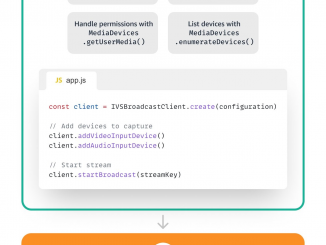
Amazon IVS 웹 브로드캐스트 SDK 를 사용하여 브라우저에서 브로드캐스트하기

2023-01-06 KENNETH 0

Amazon IVS 웹 브로드캐스트 SDK 를 사용하여 브라우저에서 브로드캐스트하기 Amazon Interactive Video Service (Amazon IVS)를 사용하면 이제 IVS 웹 브로드캐스트 SDK를 사용하여 웹 브라우저에서 직접 스트리밍할 수 있는 브로드캐스트 라이브 스트림을 시작할 수 있습니다. Amazon IVS는 빠르고 쉽게 설정할 수 있는 관리형 라이브 스트리밍 솔루션이며 대화형 비디오 경험을 만드는 데 이상적입니다. Open Broadcaster Software(OBS)와 같은 표준 스트리밍 소프트웨어를 사용하거나 IVS 웹 브로드캐스트 SDK를 사용하여 브라우저를 열면 라이브 스트림을 Amazon IVS로 보낼 수 있습니다. 이 서비스는 전 세계 모든 시청자가 저지연 비디오를 사용할 수 있도록 하는 데 필요한 모든 작업을 수행하도록 설계되어 여러분이 라이브 스트림과 함께 대화형 경험을 구축하는 데 집중할 수 있습니다. Amazon IVS는 개발자 커뮤니티에서 라이브 스트리밍 통합을 간소화하는 것으로 잘 알려져 있습니다. 짧은 대기 시간을 제공하는 것 외에도 라이브 비디오 서비스는 “즉시” 작동하도록 설계되었습니다. Amazon IVS 플레이어 SDK, timed metadata API, 모바일 브로드캐스트 SDK 및 스트림 채팅 API를 [ more… ]

[도서] 실전에서 바로 쓰는 Next.js

2023-01-06 KENNETH 0

[도서] 실전에서 바로 쓰는 Next.js 분야별 신상품 – 국내도서 – 컴퓨터와 인터넷 [도서]실전에서 바로 쓰는 Next.js 미셸 리바 저/박수현 역 | 한빛미디어 | 2202년 03월 판매가 23,400원 (10%할인) | YES포인트 1,300원(5%지급) Next.js의 모든 기능을 낱낱이 파헤치고, 온라인 상거래 사이트까지 직접 구축해보는 웹 개발 실전서 이 책의 강점은 리액트-Next.js를 함께 사용하는 방법과 Next.js를 단독으로 사용할 수 있는 실질적인 방법을 Source: [도서] 실전에서 바로 쓰는 Next.js

No Image

USN-5789-1: Linux kernel (OEM) vulnerabilities

2023-01-06 KENNETH 0

USN-5789-1: Linux kernel (OEM) vulnerabilities It was discovered that the NFSD implementation in the Linux kernel did not properly handle some RPC messages, leading to a buffer overflow. A remote attacker could use this to cause a denial of service (system crash) or possibly execute arbitrary code. (CVE-2022-43945) Jann Horn discovered that the Linux kernel did not properly track memory allocations for anonymous VMA mappings in some situations, leading to potential data structure reuse. A local attacker could use this to cause a denial of service (system crash) or possibly execute arbitrary code. (CVE-2022-42703) Roger Pau Monné discovered that the Xen virtual block driver in the Linux kernel did not properly initialize memory pages to be used for shared communication with the backend. A local attacker could use this to expose sensitive information (guest kernel memory). (CVE-2022-26365) Jan Beulich discovered [ more… ]

No Image

Announcing Windows 11 Insider Preview Build 25272

2023-01-06 KENNETH 0

Announcing Windows 11 Insider Preview Build 25272 Hello Windows Insiders, today we are releasing Windows 11 Insider Preview Build 25272 to the Dev Channel. TL;DR For our first Dev Channel flight for 2023, we have a build with a nice set of improvements and fixes for Insiders. [Changes and Improvements] [General] Moved Quick Assist out of Windows Tools so it displays directly in the Start menu’s All apps list and is easier to find. We are removing the suggestion action for searching copied text in Microsoft Edge and showing recommend common websites on the Recommended section in Start – both of which began rolling out with Build 25247. Thanks to all the Insiders who gave us feedback on these two experiences. As a reminder, features and experiences we try out in the Dev Channel may get removed and never released [ more… ]

Announcing Windows 11 Insider Preview Build 22621.1095 and 22623.1095

2023-01-06 KENNETH 0

Announcing Windows 11 Insider Preview Build 22621.1095 and 22623.1095 Hello Windows Insiders, today we are releasing Windows 11 Insider Preview Build 22621.1095 and Build 22623.1095 (KB5022364) to the Beta Channel. Build 22623.1095 = New features rolling out. Build 22621.1095 = New features off by default. REMINDER: Insiders who were previously on Build 22622 will automatically get moved to Build 22623 via an enablement package. The enablement package artificially increments the build number for the update with new features getting rolled out and turned on to make it easier to differentiate from devices with the update with features off by default. This approach is being used for the Beta Channel only and is not indicative of any changes or plans for final feature rollouts. Insiders who landed in the group with new features turned off by default (Build 22621.xxxx) can check for [ more… ]