

RHBA-2017:1368-1: cns-deploy-tool bug fix update
RHBA-2017:1368-1: cns-deploy-tool bug fix update Red Hat Enterprise Linux: Updated cns-deploy-tool package that fixes a bug is now available. Source: RHBA-2017:1368-1: cns-deploy-tool bug fix update
RHBA-2017:1368-1: cns-deploy-tool bug fix update Red Hat Enterprise Linux: Updated cns-deploy-tool package that fixes a bug is now available. Source: RHBA-2017:1368-1: cns-deploy-tool bug fix update
RHBA-2017:1370-1: Red Hat Certification bug fix and enhancement update Red Hat Enterprise Linux: An updated redhat-certification package that fixes several bugs and adds various enhancements is now available for Red Hat Enterprise Linux 6 and Red Hat Enterprise Linux 7. Source: RHBA-2017:1370-1: Red Hat Certification bug fix and enhancement update
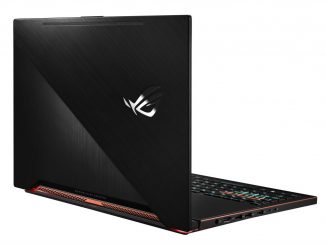
Computex 2017: ASUS unveils new ROG Zephyrus for gaming, powered by Windows 10 The ROG Zephyrus delivers next-generation gaming experience for the enthusiast gamer. Built with Windows 10, these devices arrive equipped with the Xbox app and Direct X12, can take advantage of Xbox Play Anywhere and have Cortana* – your digital personal assistant who can help you complete tasks, set reminders and more – and comprehensive security with Windows Defender built-in. Powered by the latest Intel Core i7 processor, the ROG Zephyrus gives you the gaming performance you need while also providing portability. It also has the highest NVIDIA GeForce GTX graphics (GTX 1080) for supreme visuals and is VR Ready. The ROG Zephyrus has enhanced keyboard features with a new type of trackpad located to the right of the keyboard for ideal gaming usage that doubles as a numeric [ more… ]
Computex 2017: Dell debuts new Inspiron AIOs and VR gaming desktop with Windows 10 Available starting today on Dell.com and at retailers in China including JD.com, and worldwide in the coming weeks, Dell’s new lineup includes the Inspiron 27 7000 AIO, the Inspiron 24 5000 AIO and the new Inspiron Gaming Desktop — the first gaming desktop to join Dell’s expanding Inspiron Gaming line-up. Built with Windows 10, these devices arrive equipped with the Xbox app and Direct X12, and can take advantage of Xbox Play Anywhere and have your personal digital assistant Cortana* and comprehensive security with Windows Defender built-in. Let’s take a closer look at these devices: Inspiron Gaming doubles down with first-ever gaming desktop Dell announced today its first-ever Inspiron Gaming desktop with Windows 10, built for gamers seeking a competitive advantage at an affordable price. The [ more… ]

GUEST OS 로 centos 를 설치했다면 아마도 지원되는 해상도가 1024×768 이 최대치 일듯 좀더 원활하게 X를 사용하기 위해서는 보다 큰 해상도가 지원되어야 하는데 이를 위해서는 약간의 작업이 필요함 1. VirtualBox 인스턴스 메뉴의 ”장치” -> ”게스트 확장 CD 이미지 삽입” 을 선택하면 바탕 화면에 ”VBOXADDITIONS 버전 빌드” 이름의 아이콘이 생김 2. 해당 아이콘을 더블클릭 하면 /run/media/계정명/VBOXADDITIONS 버전 빌드 위치로 마운트 됨 3. 해당 위치로 이동후 ./VBoxLinuxAdditions.run 을 실행하면 분단위의 시간이 소요되면서 설치가 됨 3-1. 간혹 이런 오류가 발생할 수 있음 VirtualBox Guest Additions installer Removing installed version 5.1.22 of VirtualBox Guest Additions… Copying additional installer modules … Installing additional modules … vboxadd.sh: Starting the VirtualBox Guest Additions. Failed to set up service vboxadd, please check the log file /var/log/VBoxGuestAdditions.log for details. 이런 오류가 발생하면 yum install dkms 명령을 이용해서 패키지를 설치해준뒤 다시 실행하면 정상 설치 될것임 혹시라도 패키지를 찾을 수 없다면 [ more… ]
Copyright © 2025 | WordPress Theme by MH Themes