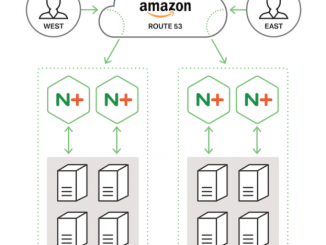
Global Load Balancing with Amazon Route 53 and NGINX Plus

2016-10-14 KENNETH 0

Global Load Balancing with Amazon Route 53 and NGINX Plus In a classic study, the retail division of Amazon tested various page load times and found that revenue dropped 1% for each additional 100 milliseconds it took for a page to load. It’s no surprise that application performance directly impacts revenue, as customers increasingly expect instant access from anywhere to the applications they depend on. With the amount of competition in today’s digital economy, customers can quickly and easily move to a competitor if your site doesn’t meet their expectations. Global load balancing (GLB) – also called global server load balancing or GSLB – improves load times by directing end users to the copy of a resource that is closest to them (where “closest” is usually measured in terms of network latency). A lot of our customers that host applications in Amazon Web Services [ more… ]

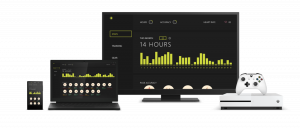
Internet of Things on the Xbox (App Dev on Xbox series)

2016-10-14 KENNETH 0

Internet of Things on the Xbox (App Dev on Xbox series) This week’s app is all about the Internet of Things. Best For You is a sample fitness UWP app focused on collecting data from a fictional IoT enabled yoga wear and presenting it to the user in a meaningful and helpful way on all of their devices to track health and progress of exercise. In this post, we will be focusing on the IoT side of the Universal Windows Platform as well as Azure IoT Hub and how they work together to create an end-to-end IoT solution. The source code for the application is available on GitHub right now so make sure to check it out. If you missed the previous blog post on Hosted Web Apps, make sure to check it out for in-depth on how to build [ more… ]

5 Reasons to Switch to Software Load Balancing

2016-10-14 KENNETH 0

5 Reasons to Switch to Software Load Balancing td { padding-right: 10px; } This post is adapted from a webinar by Floyd Smith and Faisal Memon from NGINX,  Inc. Our new ebook on the topic is available for download. Table of Contents 0:00 Introduction 1:38 Who Are You? 3:53 From Hardware to Software 6:33 The Leading Web Server for the Busiest Sites in the World 8:48 Where NGINX Fits 9:32 Modern Web Architecture 10:42 DevOps Works Great with NGINX 12:30 NGINX Plus Capabilities 14:41 Customer Case Study – WordPress.com 16:42 Customer Case Study – Montana Interactive 18:43 Customer Case Study – BuyDig.com 20:10 Ebook – 5 Reasons to Switch to Software for Load Balancing 21:22 Reason #1 – Dramatically Reduce Costs 23:19 NGINX Plus vs. F5 BIG‑IP 24:37 NGINX Plus vs. Citrix NetScaler 26:52 Reason #2 – DevOps Requires Software Application Delivery 31:59 Reason #3 – Deploy Everywhere with One ADC 35:42 Reason #4 – Adapt Quickly [ more… ]

Amazon ElastiCache 업데이트 – Redis Sharded Cluster 추가 및 3.1 버전 지원

2016-10-14 KENNETH 0

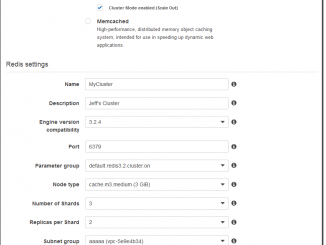
Amazon ElastiCache 업데이트 – Redis Sharded Cluster 추가 및 3.1 버전 지원 많은 AWS 고객들이 Amazon ElastiCache를 인-메모리 데이터 저장소로 이용하고 있습니다. 2013년 Amazon ElastiCache for Redis를 출시하고 스냅샷 S3로 내보내기 기능, 엔진 버전 업데이트, 확장 기능, 태그 , Multi-AZ에서 자동 장애 복구 기능을 계속 추가했습니다. 오늘 몇 가지 새로운 기능을 ElastiCache for Redis에 추가하게 되었습니다. Sharded Cluster 지원 – 3.5 TiB 이상의 메모리 데이터로 처리 할 수있는 sharded cluster를 만들 수있게되었습니다 콘솔 개선 – 이전보다 쉽게 클러스터의 생성과 유지 보수 할 수있게되었습니다 엔진 업데이트 – Redis 3.2의 기능을 사용할 수있게되었습니다 Geospatial Data – 공간 데이터의 처리를 할 수 사용할 수 있습니다 한 가지씩 살펴 보도록 하겠습니다. Sharded Cluster 지원 및 콘솔 개선 지금까지 ElastiCache for Redis는 하나의 기본 노드와 5개까지의 읽기 복제본(read replica)을 포함한 클러스터를 지원했습니다. 이 구성에서 메모리 크기가 클러스터 당 237GiB로 제한되어있었습니다. 하나의 클러스터에서 15까지 샤드(Shard)를 만들 [ more… ]

Announcing Windows 10 Insider Preview Build 14946 for PC and Mobile

2016-10-14 KENNETH 0

Announcing Windows 10 Insider Preview Build 14946 for PC and Mobile Hello Windows Insiders! Today we are excited to be releasing Windows 10 Insider Preview Build 14946 for PC and Mobile to Windows Insiders in the Fast ring. What’s new in Build 14946 Customizing your precision touchpad experience (PC): Last week, we announced that we’d been working on refining your touchpad experience. This week, we’re taking that one step further. When you go into Settings > Devices > Touchpad, you will now find a section called “Other gestures”. In this section, you now have basic customization options for your three and four finger gestures. For taps, you can select between Cortana, Action Center, play/pause or middle mouse button, and for left/right swipes, you can select between switching apps or switching virtual desktops. Try it out and let us know what [ more… ]