HP’s new Windows 11 devices provide wide range of choices for a hybrid world

2021-09-22 KENNETH 0

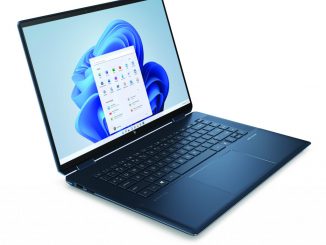
HP’s new Windows 11 devices provide wide range of choices for a hybrid world HP’s newest Windows 11 devices are designed for people who learn, play and work from home, at the office and on the go. Along with the company’s new premium and mainstream PCs, HP will also begin shipping Windows 11 across its existing portfolio beginning later this fall. Select devices will include a FREE Upgrade to Windows 11 when available (see below*). The HP Spectre x360 16 – the first HP consumer notebook made with recycled CNC aluminum to help reduce its environmental impact – includes a 5 MP IR camera that makes it easy to login using Windows Hello. The camera also features a physical shutter controlled by a hot key, with an on-screen display shown in all apps that use the camera to remind the [ more… ]
Redesigned Photos app for Windows 11 begins rolling out to Windows Insiders

2021-09-17 KENNETH 0

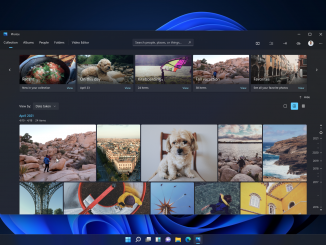
Redesigned Photos app for Windows 11 begins rolling out to Windows Insiders Hello Windows Insiders, today we are beginning to roll out the redesigned Photos app for Windows 11 to all Windows Insiders in the Dev Channel. Pumped to share another #Windows11 first look with you – the beautifully redesigned #PhotosApp is coming soon to #WindowsInsiders pic.twitter.com/hraNJAo9iF — Panos Panay (@panos_panay) September 7, 2021 Our goal with the redesigned Photos app was to make it faster, easier, and more enjoyable for you to re-live and edit your photos on Windows 11! The redesigned Photos app includes the following changes and improvements for you to try out: Beautiful new design: The Photos app has been redesigned to align with the new visual design of Windows 11. This includes rounded corners and Mica material across the app. The new visual design also [ more… ]

No Image

Announcing Windows 11 Insider Preview Build 22000.194

2021-09-17 KENNETH 0

Announcing Windows 11 Insider Preview Build 22000.194 Hello Windows Insiders, today we are releasing Windows 11 Insider Preview Build 22000.194 to the Beta Channel and commercial PCs in the Release Preview Channel. App updates We are beginning to rollout updates for several apps that come included as part of Windows 11 to Windows Insiders in the Beta Channel. Today’s rollout includes the following app updates: Snipping Tool, Calculator, and Clock with Focus Sessions! Check for updates in the Store and try these apps out and let us know what you think! Another first look from the team…#FocusSessions on #Windows11 coming soon. This has been a game-changer for me, especially with @Spotify integration #Productivity #Creativity #WindowsInsiders pic.twitter.com/HfJh4niDiS — Panos Panay (@panos_panay) August 5, 2021 Fixes Addressed an issue where if you enable then disable a contrast theme, it would lead to [ more… ]

Announcing Windows 11 Insider Preview Build 22458

2021-09-16 KENNETH 0

Announcing Windows 11 Insider Preview Build 22458 Hello Windows Insiders, today we are releasing Windows 11 Insider Preview Build 22458 to the Dev Channel. TL;DR [REMINDER] Build numbers are higher in the Dev Channel than the Windows 11 preview builds in the Beta Channel because we’ve moved the Dev Channel back to receiving builds from our active development branch (RS_PRERELEASE). This means the builds released to the Dev Channel no longer match the Windows 11 experience that will be released to customers on October 5th. The desktop watermark you see at the lower right corner of your desktop is normal for these pre-release builds. As mentioned previously, it will be a little while before major new features show up. However, this build includes a good set of improvements and bug fixes. There is an issue impacting the Taskbar where icons [ more… ]

Microsoft announces passwordless future – available across Microsoft Edge and Microsoft 365 apps

2021-09-15 KENNETH 0

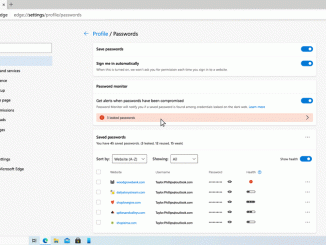
Microsoft announces passwordless future – available across Microsoft Edge and Microsoft 365 apps I don’t know a single person who enjoys managing passwords. Given how much of my life is spent online and in various apps, keeping track of it all, ensuring they’re unique and regularly updated – it can quickly become overwhelming for me – and I’m a techie! Which is why I’m so excited about today’s announcement that now you can remove the password from your Microsoft account and sign in using passwordless methods like Windows Hello, the Microsoft Authenticator mobile app or a verification code sent to your phone or email. This feature will help to protect your Microsoft account from identity attacks like phishing while providing even easier access to the best apps and services like Microsoft 365, Microsoft Teams, Outlook, OneDrive, Family Safety, Microsoft Edge [ more… ]