
Extending the Context Menu and Share Dialog in Windows 11

2021-07-20 KENNETH 0

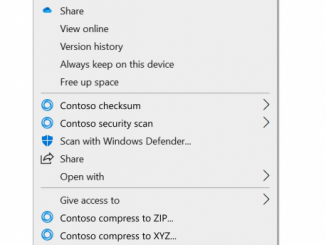
Extending the Context Menu and Share Dialog in Windows 11 Windows 11 brings refinement to contextual file operations in the right-click context menu and share dialog. These are extensible by apps, including unpackaged Win32 apps.  The context menu is one of the most popular and useful shell extensions. If you are already in File Explorer or on the Desktop, it significantly reduces the number of steps to complete a file operation compared to opening a separate app. As useful as the Windows 10 context menu is, there are aspects of its design we sought to improve in Windows 11. The most common commands – cut, copy, paste, delete, and rename – are far from the mouse pointer, touch point, or pen. The menu is exceptionally long. It has grown in an unregulated environment for 20 years, since Windows XP, when [ more… ]

No Image

Minions x Minecraft DLC now available in Minecraft Marketplace

2021-07-17 KENNETH 0

Minions x Minecraft DLC now available in Minecraft Marketplace Minions x Minecraft DLC has launched in Minecraft Marketplace, bringing to that world a look for every plan, ruse, or misadventure. They are always ready to go the extra mile. Minions aren’t the only new arrivals in the Overworld. A whole slew of villains, including all six of the Vicious 6, also known as the world’s most notorious collective of villains and breakout stars from the upcoming “Minions: Rise of Gru,” are here too. Head over to Minecraft.net to find out more. Source: Minions x Minecraft DLC now available in Minecraft Marketplace

No Image

Easier browser debugging with Developer Tools integration in Visual Studio Code

2021-07-17 KENNETH 0

Easier browser debugging with Developer Tools integration in Visual Studio Code If you’re debugging JavaScript in Visual Studio Code you probably have used either the Chrome Debugger or the Microsoft Edge Debugger extension. Neither are necessary any longer to debug as JavaScript debugging is now built-in to Visual Studio Code. This does not only mean that you can uninstall these extensions, but we also made debugging more convenient. To debug any project in either Chrome or Microsoft Edge, all you need to do is to start a session by pressing F5 or activating the debug icon in the menu bar and selecting “Run and debug”. Alternatively, you can also use the Visual Studio Code command palette and run the “Debug: Open Link” command. From there on you can choose to debug in Chrome, Edge or Node.js without having to install [ more… ]

No Image

Releasing Windows 10 Build 19043.1147 (21H1) to Release Preview Channel

2021-07-16 KENNETH 0

Releasing Windows 10 Build 19043.1147 (21H1) to Release Preview Channel Hello Windows Insiders, today we’re releasing 21H1 Build 19043.1147 (KB5004296) to the Release Preview Channel for those Insiders who are on 21H1. NOTE: Windows Insiders in the Beta Channel on 21H1 will not receive this update. We will be flighting Windows 11 Insider Preview builds to these Insiders soon! This update includes the following improvements: We fixed an issue with searchindexer. After you sign out, searchindexer continues to hold handles to the per user search database in the profile path, “C:UsersusernameAppDataRoamingMicrosoftSearchDataApplications”. As a result, searchindexer stops working and duplicate profile names are created. We fixed an issue that prevents gaming services from opening certain games for desktop users. We fixed an issue that prevents you from entering text using the Input Method Editor (IME). This might occur, for example, after [ more… ]

No Image

Announcing Windows 10 Insider Preview Build 19044.1147 (21H2)

2021-07-16 KENNETH 0

Announcing Windows 10 Insider Preview Build 19044.1147 (21H2) Hello Windows Insiders, today we are announcing Windows 10, version 21H2 as the next feature update to Windows 10. As part of today’s announcement, we’re also releasing 21H2 Build 19044.1147 (KB5004296) to the Release Preview Channel ONLY to Insiders who were moved from the Beta Channel to the Release Preview Channel because their PC did not meet the hardware requirements for Windows 11. We are releasing this build to those Insiders via our “seeker” experience in Windows Update. This means these Insiders will need to go to Settings > Update & Security > Windows Update and choose to download and install 21H2. The features highlighted in John Cable’s blog post for Windows 10, version 21H2 are not yet in this build but will be included in a future update. It also includes the [ more… ]