
New computers: why get one now and what to look for

2020-07-01 KENNETH 0

New computers: why get one now and what to look for What with the huge growth in video calling and the fact many of us spend a lot more time using our tech devices to stay connected, entertained and educated, yesterday’s computers often just don’t do the trick anymore. If you’re on the fence about whether now is the time to replace your computer and what features you should look for if you do, head over to the Windows Home and Family Resources Blog. There you’ll find three main reasons to upgrade, what processor to choose based on your needs and budget, the best drive for you and more. The post New computers: why get one now and what to look for appeared first on Windows Blog. Source: New computers: why get one now and what to look for
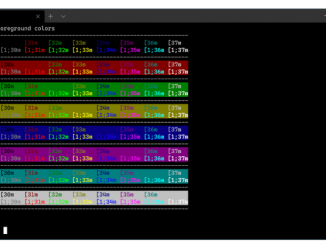
3 Ways to Customize Your Windows Terminal

2020-07-01 KENNETH 0

3 Ways to Customize Your Windows Terminal Windows Terminal is here! From the buzz of the announcement at Microsoft Build 2019 to the release of 1.0 at Build 2020, it’s generated excitement and interest from the dev community. Get started by downloading the Preview here. As a refresher, Windows Terminal is a new, modern, fast, efficient, powerful, and productive terminal application for users of command-line tools and shells like Command Prompt, PowerShell, and WSL. Its main features include multiple tabs, panes, Unicode and UTF-8 character support, a GPU accelerated text rendering engine, and the ability to create your own themes and customize text, colors, backgrounds, and shortcut key bindings. Today, we’re digging into three ways to tailor the Terminal to your preference: colors, cursor, and tabs. Choose your Colors Windows Terminal includes the following named color schemes inside the defaults.json [ more… ]

No Image

Check out ‘Simply Windows’ to find out how to get more organized using Microsoft Edge

2020-06-30 KENNETH 0

Check out ‘Simply Windows’ to find out how to get more organized using Microsoft Edge The latest “Simply Windows” video is now available, focusing on tips for organizing your tabs in Microsoft Edge. If you’re new to Windows 10 or want to learn more about how to get the most out of it, this video series can help you get up to speed. And as writers in the series have had to work from home, like many people, they’re sharing their remote experiences in these newer episodes and answering questions from viewers. In episode 12, writer Maxx Ramos guides you through working with Microsoft Edge, specifically on using Collections to organize the many, many tabs you may have open on your browser. This way, you can quickly pull up the tabs according to those collections, which could align to shopping, [ more… ]

Spending more time in the kitchen? 7 ways to make tech your chef’s assistant

2020-06-26 KENNETH 0

Spending more time in the kitchen? 7 ways to make tech your chef’s assistant Many of us are finding ourselves in the kitchen a lot more these days. If you’d like to focus that time on upping your gourmet game, check out the ways your tech devices can help you plan healthy and delicious meals, cook them like a pro, plan your shopping trips efficiently and more. Read all about it on the Windows Home and Family Resources Blog – and bon appétit! The post Spending more time in the kitchen? 7 ways to make tech your chef’s assistant appeared first on Windows Blog. Source: Spending more time in the kitchen? 7 ways to make tech your chef’s assistant

Now available: new State of Decay 2 Plunder Pack and Green Zone update

2020-06-25 KENNETH 0

Now available: new State of Decay 2 Plunder Pack and Green Zone update State of Decay 2 recently celebrated its two-year anniversary with new weapons, clothes, gameplay improvements and more. Now its fans can enjoy a new Plunder Pack and Green Zone updates. The new Plunder Pack adds Sea of Thieves-themed weapons, outfits, hats and one seriously salty vehicle to the game. The Green Zone is a more relaxed, accessible apocalypse; where enemies do less damage, maintaining the community becomes easier due to cheaper crafting and more resources from scavenging and your Stamina lasts longer. The update is available for all players, with State of Decay 2: Juggernaut Edition available with Xbox Game Pass, Xbox One, Windows 10 PC, Steam and the Epic Games Store. Get all the details over at Xbox Wire. The post Now available: new State of [ more… ]