Now available: Samsung Galaxy Book Flex and Samsung Galaxy Book Ion

2020-05-05 KENNETH 0

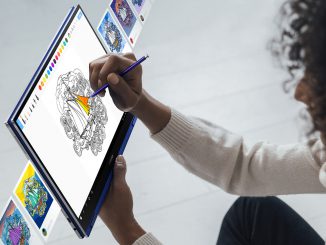
Now available: Samsung Galaxy Book Flex and Samsung Galaxy Book Ion Announced last fall, two new Samsung Windows 10 PCs are now available: the Galaxy Book Flex and the Galaxy Book Ion. Samsung Galaxy Book Flex 15″ The Samsung Galaxy Book Flex is a 2-in-1 PC with a QLED display packed with all the sharpness, detail and colors you’re used to on your TV, combined with an ultra-slim, convertible design that seamlessly converts from laptop to tablet. It comes in 13-and-15-inch versions. But it’s got a lot going on under that attractive exterior. A 10th Gen Intel Core i7 processor delivers split-second responsiveness for easy multitasking. The Wireless PowerShare turns your trackpad into a charging pad, and with its multi-workday battery life, you can keep working and creating uninterrupted. Wireless charging Another bonus: the ability to control presentations and other [ more… ]
HP reveals redesigned and highly customizable OMEN gaming desktops

2020-05-04 KENNETH 0

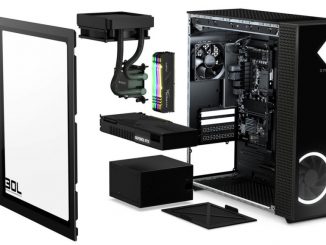
HP reveals redesigned and highly customizable OMEN gaming desktops As people stay at home due to lockdowns across the country, they’re turning to games more than ever to relieve stress and connect with others. Now they’ve got more hardware options to choose from with HP’s latest additions to their gaming suite: the OMEN 25L and 30L Desktops. On both models, gamers will find visuals powered by up to NVIDIA’s GeForce RTX 2080 Ti or up to AMD’s Radeon RX 5700 XT graphics cards. Harness the computing power a game needs with up to the latest 10th Gen Intel Core i9-10900K or up to the latest 3rd Gen AMD Ryzen 9 3900 desktop processors. To keep the CPU running cool, HP has worked with Cooler Master to offer both 92mm air and 120mm liquid cooler options. In addition to this alliance on the thermals side, HP has extended the relationship to include [ more… ]

Getting the May 2020 Update Ready for Release – UPDATED

2020-05-01 KENNETH 0

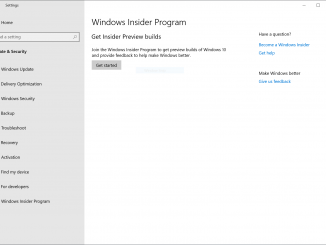
Getting the May 2020 Update Ready for Release – UPDATED Hello Windows Insiders! We are continuing to work on getting the Windows 10 May 2020 Update (20H1) ready for release. Today we are releasing Build 19041.208 to Windows Insiders in the Release Preview ring. While we originally thought that Build 19041.207 would be the final build, we made the decision to take in one more fix we felt was important to have before making the May 2020 Update generally available. We believe that Build 19041.208 is the new final build and still plan on continuing to improve the overall experience of the May 2020 Update on customers’ PCs as part of our normal servicing cadence. Build 19041.208 (KB4558244) includes all of the 20H1 features and is cumulative and includes all the fixes released to Windows Insiders in the Slow ring [ more… ]

Rust/WinRT Public Preview

2020-05-01 KENNETH 0

Rust/WinRT Public Preview We are excited to announce that the Rust/WinRT project finally has a permanent and public home on GitHub: https://github.com/microsoft/winrt-rs Rust/WinRT follows in the tradition established by C++/WinRT of building language projections for the Windows Runtime using standard languages and compilers, providing a natural and idiomatic way for Rust developers to call Windows APIs. Rust/WinRT lets you call any WinRT API past, present, and future using code generated on the fly directly from the metadata describing the API and right into your Rust package where you can call them as if they were just another Rust module. The Windows Runtime is based on Component Object Model (COM) APIs under the hood and is designed to be accessed through language projections like C++/WinRT and Rust/WinRT. Those language projections take the metadata describing various APIs and provide natural bindings for [ more… ]

Using multiple profiles at work and at home is now easier with Microsoft Edge

2020-05-01 KENNETH 0

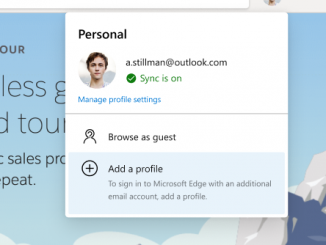
Using multiple profiles at work and at home is now easier with Microsoft Edge Our customers tell us that they like to keep their browsing data separate as they take on various roles in their lives. For people at home working from their own devices, this is particularly important. Microsoft Edge’s “Profiles” feature is a great way to do this, whether you’re switching between work and personal browsing, juggling your job and freelancing business, or managing your tasks as an admin alongside other responsibilities. In this post, we’ll share some improvements coming to browsing with multiple profiles in Microsoft Edge, and walk you through how to get started with this feature. Setting up multiple profiles To get started with multiple profiles, click the profile icon to the right of your address bar and click “Add a profile”. Then, on the [ more… ]