Find out how DIYer and TV host Trisha Hershberger’s journey through PC gaming keeps evolving

2020-04-10 KENNETH 0

Find out how DIYer and TV host Trisha Hershberger’s journey through PC gaming keeps evolving Trisha Hershberger first fell into technology as a result of her gaming habits. At that time her parents didn’t think this was a hobby for girls, because in the ’80s video games were primarily marketed towards boys. But fortunately, her parents eventually gave in. Her dad brought home an old, used Commodore 64 from a guy he knew at work. That was her first foray into gaming. Zork and Ultima were some of her favorites, followed by classic PC games such as King’s Quest, Monkey Island and the Myst series. Eventually she got a Nintendo Entertainment System – at the same time her friends were moving onto Super Nintendo. But that’s when her parents finally blocked her, thinking that at 9 years old, she was [ more… ]
Announcing Windows 10 Insider Preview Build 19603

2020-04-09 KENNETH 0

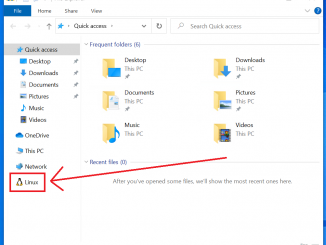
Announcing Windows 10 Insider Preview Build 19603 Hello Windows Insiders, today we’re releasing Windows 10 Insider Preview Build 19603 to Windows Insiders in the Fast ring. You can check out our Windows Insider Program documentation here, including a list of all the new features and updates released in builds so far. Not seeing any of the features in this build? Check your Windows Insider Settings to make sure you’re on the Fast ring. Submit feedback here to let us know if things weren’t working the way you expected. If you want a complete look at what build is in which Insider ring, head over to Flight Hub. Please note, there will be a slight delay between when a build is flighted and when Flight Hub is updated. What’s new in Build 19603 File Explorer Integration in the Windows Subsystem for [ more… ]

No Image

Latest ‘Simply Windows’ video: A work from home episode shows how to use Quick Assist

2020-04-07 KENNETH 0

Latest ‘Simply Windows’ video: A work from home episode shows how to use Quick Assist The newest “Simply Windows” video is now available, focusing on Microsoft Quick Assist, an app in Windows 10 that enables two people to share a computer over a remote connection so that one can solve problems on the other’s computer. If you’re new to Windows 10 or want to learn more about how to get the most out of it, this video series can help you get up to speed on using it. In this “work from home edition!” of the series, writer Doug Thomas walks through Quick Assist, showing how to launch it and then within it, how to use features such as chat, annotations and adjusting how the screen looks. Find out more about “Simply Windows” and check out a playlist of previous [ more… ]

Scrolling personality improvements in Microsoft Edge

2020-04-03 KENNETH 0

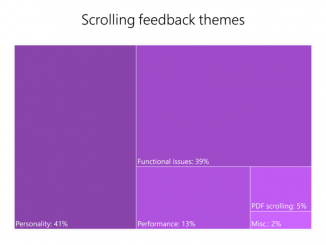
Scrolling personality improvements in Microsoft Edge Scrolling is one of the most common user interactions in a browser, and it’s central to how we experience the web. Whether you’re using a touchpad, touch screen, mouse wheel, keyboard, or scroll bars, you want your scrolling experience to be fast and responsive. In this post, we’ll cover how we’ve improved scrolling personality in Microsoft Edge – scroll animation and how it reacts to your interactions, looks and feel of scrolling. Additionally, we’ll summarize themes we’ve observed in your feedback, and outline some of the next steps on our journey. In a future post we will describe some of the performance and functional improvements we’ve been working on. Learning from the past In previous releases of Microsoft Edge, we enabled smooth scrolling through tight integration with the operating system Compositor (DirectComposition) and input [ more… ]

New Razer Blade 15 gaming laptop packs even more performance and new hardware innovations in a compact package

2020-04-03 KENNETH 0

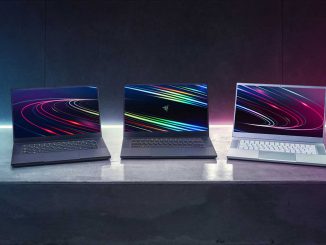
New Razer Blade 15 gaming laptop packs even more performance and new hardware innovations in a compact package Gamers, content creators and entertainment enthusiasts will soon be able to check out the next evolution of the Razer Blade 15 gaming laptop, loaded with Windows 10, an up to an 8-core 10th Gen Intel Core i7 processor, NVIDIA GeForce RTX Super graphics and a 300Hz display, all packed into a compact, signature matte black chassis. Upgrades include a refreshed keyboard, improved I/O, new Intel Wi-Fi 6 AX201 (Gig+) wireless, capable of up to 2.4Gbps network speeds and increased storage options. The Blade 15 is the first 8-core processor in any Razer Blade, which helps achieve even greater levels of performance over the last generation with up to 5.1GHz clock speeds and up to 16MB of Intel Smart Cache. The increased core [ more… ]