
No Image

Releasing Windows 10 Insider Preview Build 19041.84 to WSUS

2020-02-27 KENNETH 0

Releasing Windows 10 Insider Preview Build 19041.84 to WSUS Hello Windows Insiders, we have released 20H1 Build 19041.84 via WSUS that contains the latest security fixes for organizations to prepare for releasing Windows 10 version 2004 in their organizations. This release will replace the existing content in Windows Pre-Release if you have already added it to your catalog. Please visit our original announcement on Tech Community for additional details on our support for WSUS.  This build contains all updated features, fixes, and security updates previously announced in 20H1. The Windows Insider Docs page contains more information on the changes made up until this point and includes a complete list of features available in 20H1. If you or your organization need help installing preview builds from WSUS, these instructions are available to help you get started.  Thanks, BLB The post Releasing [ more… ]
No Image

TraceProcessor 1.0.0

2020-02-25 KENNETH 0

TraceProcessor 1.0.0 TraceProcessor version 1.0.0 is now available on NuGet with the following package ID: Microsoft.Windows.EventTracing.Processing.All This release contains bug fixes, API finalization and minor enhancements since version 0.3.0. Most of these changes were released recently in version 0.4.0. (A full changelog is below). Basic usage is still the same as in version 0.1.0 and version 0.2.0. With version 1.0.0, we have stabilized the API, and following semantic versioning, no breaking changes (source or binary) will be made within the 1.x.y versions of these packages. Note that there are a few parts of the API that are in preview and under active development; they may change in future releases; namely, the following types: IEventConsumer IScheduledConsumer ICompletable ConsumerSchedule ExtendedDataItem ExtendedDataItemReadOnlySpan ICompletableTwoPassEventConsumer IFilteredEventConsumer IFilteredTwoPassEventConsumer ITwoPassEventConsumer TraceEventCallback UnparsedGenericEvent As before, if you find these packages useful, we would love to hear from you, [ more… ]

No Image

New to Windows 10? Check out ‘Simply Windows’ videos to get up to speed

2020-02-25 KENNETH 0

New to Windows 10? Check out ‘Simply Windows’ videos to get up to speed If you’re new to Windows 10 or want to learn more about how to get the most out of it, there’s now a video series to help you get up to speed on using it: “Simply Windows.” The first five episodes are now available on a playlist, with more to follow in the coming weeks. Writers serve as friendly hosts to walk you through tasks like finding your files, getting apps from the Microsoft Store and signing in with a Microsoft account. Writers at Microsoft help bring the voice of customers directly into its products – from the words you see in your software and hardware, to learning content that helps you improve your skills, to support content when you run into a problem. Their goal [ more… ]

Announcing Windows 10 Insider Preview Build 19569

2020-02-21 KENNETH 0

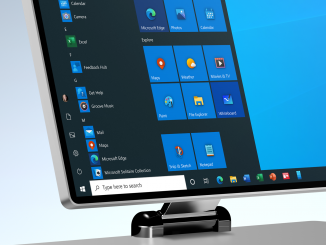
Announcing Windows 10 Insider Preview Build 19569 Hello Windows Insiders, today we’re releasing Windows 10 Insider Preview Build 19569.1000 to Windows Insiders in the Fast ring. You can check out our Windows Insider Program documentation here, including a list of all the new features and updates released in builds so far. Not seeing any of the features in this build? Check your Windows Insider Settings to make sure you’re on the Fast ring. Submit feedback here to let us know if things weren’t working the way you expected. If you want a complete look at what build is in which Insider ring, head over to Flight Hub. Please note, there will be a slight delay between when a build is flighted and when Flight Hub is updated. Evolving the Windows 10 icons We are currently working on a multi-year effort [ more… ]

No Image

Simplifying Microsoft Edge configuration profiles for Jamf Pro

2020-02-21 KENNETH 0

Simplifying Microsoft Edge configuration profiles for Jamf Pro With our Microsoft Edge Beta Channel 81 release, we’re excited to announce preview support for Jamf Pro’s 10.19 changes to the Application & Custom Settings menu. This feature lets IT Admins paste a custom JSON policy manifest for creating configuration profiles directly in Jamf Pro instead of composing and uploading a plist file. To learn about this feature from Jamf, read more about it at https://jamf.it/computer-configuration-profiles. What is Jamf Pro’s Application & Custom Settings menu? Before Jamf Pro 10.18, managing Office 365 involved manually building a .plist file. This was a time-consuming workflow that required a strong technical background. Jamf Pro 10.18 eliminated those barriers by streamlining the configuration process. However, IT Admins could only use this new user interface for specific applications and preference domains specified by Jamf. In Jamf Pro [ more… ]