No Image

Windows Server 2019 Includes OpenSSH

2018-12-12 KENNETH 0

Windows Server 2019 Includes OpenSSH The OpenSSH client and server are now available as a supported Feature-on-Demand in Windows Server 2019 and Windows 10 1809! The Win32 port of OpenSSH was first included in the Windows 10 Fall Creators Update and Windows Server 1709 as a pre-release feature. In the Windows 10 1803 release, OpenSSH was released as a supported feature on-demand component, but there was not a supported release on Windows Server until now. OpenSSH is a collection of client/server utilities that enable secure remote login, remote file transfer, and public/private key pair management. OpenSSH is a powerful tool that originated as part of the OpenBSD project and has been used for many years across the BSD, Linux, macOS, and Unix ecosystems. Adding OpenSSH to Windows Server 2019 allows organizations that work across a broad range of operating systems to use a consistent set of tools [ more… ]
Announcing Windows 10 Insider Preview Build 18298

2018-12-11 KENNETH 0

Announcing Windows 10 Insider Preview Build 18298 Hello Windows Insiders, today we are releasing Windows 10 Insider Preview Build 18298 (19H1) to Windows Insiders in the Fast ring. REMINDER: As is normal with builds early in the development cycle, builds may contain bugs that might be painful for some. If this makes you uncomfortable, you may want to consider switching to the Slow ring. Slow ring builds will continue to be higher quality. If you are looking for a complete look at what build is in which Insider ring – head on over to Flight Hub. You can also check out the rest of our documentation here including a complete list of new features and updates that have gone out as part of Insider flights for the current development cycle (which currently is 19H1). What’s new in Build 18298 Consolidating [ more… ]

Waiting until the last minute to shop for the holidays? You’re not alone, and Microsoft Store has you covered

2018-12-11 KENNETH 0

Waiting until the last minute to shop for the holidays? You’re not alone, and Microsoft Store has you covered For some, holiday gift giving is an exercise in ingenuity, and shoppers become even more resourceful as the countdown winds down. Microsoft Store conducted an online survey* with U.S. shoppers who self-identify as last-minute gifters. They shared why they procrastinate when it comes to purchasing gifts. The survey revealed that the majority of last-minute gift shopping is done in two weeks or less, with 25 percent taking place in two days or less – and 37 percent feel stressed about it. If you’re one of these shoppers, Microsoft Store can help you up your gifting game this holiday season and ease the pressure thanks to free shipping and returns on every item, every day. You can also buy your gifts online [ more… ]

No Image

Windows monthly security and quality updates overview

2018-12-11 KENNETH 0

Windows monthly security and quality updates overview Today’s global cybersecurity threats are both dynamic and sophisticated, and new vulnerabilities are discovered almost every day. We focus on protecting customers from these security threats by providing security updates on a timely basis and with high quality.  We strive to help you keep your Windows devices, regardless of which version of Windows they are running, up to date with the latest monthly quality updates to help mitigate the evolving threat landscape. That is why, today, as part of our series of blogs on the Windows approach to quality, I’ll share an overview of how we deliver these critical updates on a massive scale as a key component of our ongoing Windows as a service effort. Quality and security at scale The scale and diversity of the Windows ecosystem requires us to take [ more… ]

Windows 10 Tip: SwiftKey

2018-12-11 KENNETH 0

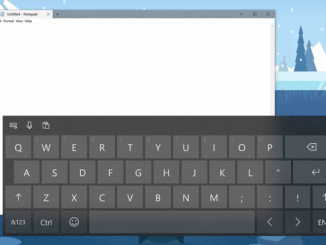
Windows 10 Tip: SwiftKey With the Windows 10 October 2018 Update comes SwiftKey intelligence. Available on both Android and iOS, SwiftKey delivers more accurate autocorrections and predictions by adapting to your writing style – including the words, phrases and emoji that matter to you. Starting with the October 2018 Update, SwiftKey now powers the typing experience on Windows when using the touch keyboard, making it faster to write in English (United States), English (United Kingdom), French (France), German (Germany), Italian (Italy), Spanish (Spain), Portuguese (Brazil) or Russian. Check it out in action: If you like this, check out more Windows 10 Tips. The post Windows 10 Tip: SwiftKey appeared first on Windows Blog. Source: Windows 10 Tip: SwiftKey