
No Image

Find out how easy it is to make videos in Microsoft Photos

2018-07-27 KENNETH 0

Find out how easy it is to make videos in Microsoft Photos When Alex Thomopoulos says “Get down, rise up,” she’s asking you what you’re passionate about and what makes you get up every day to pursue it. It’s a motto she reinforces as a Burton Girls Ambassador. The program encourages strength, independence and creativity for young women. Food is one thing that makes Thomopoulos get down and rise up. As a chef and entrepreneur, Thomopoulos can tell you how to make a gluten-free Meyer lemon cake, but she admits making videos that will take her business to the next level is not her forte. “I know how to cook, but I don’t understand technology at all,” she says. Fortunately, she gets help from Ashlie Little, a Microsoft product specialist, who shows Thomopoulos how to use the Microsoft Photos app [ more… ]
Announcing Windows 10 Insider Preview Build 17723 and Build 18204

2018-07-26 KENNETH 0

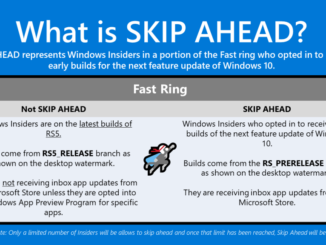
Announcing Windows 10 Insider Preview Build 17723 and Build 18204 Hello Windows Insiders! Today, we are releasing Windows 10 Insider Preview Build 17723 (RS5) to Windows Insiders in the Fast ring and Build 18204 (19H1) to Windows Insiders who have opted in to Skip Ahead. Going forward, RS5 builds will come from the RS5_RELEASE branch. For Insiders who chose to “skip ahead”, 19H1 builds will continue to come from the RS_PRERELEASE branch. Insiders can see the branch name in the watermark at the lower right of their desktop. Right now, the builds from these branches are largely the same which is why we’re only doing a single blog post for both of today’s new builds. However, in the future we will be doing separate blog posts for each. To summarize all this, see the below graphic that explains what Skip [ more… ]

Top 4 ways to optimize your Microsoft Store listing

2018-07-26 KENNETH 0

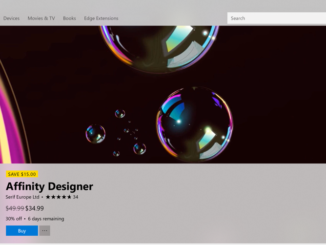
Top 4 ways to optimize your Microsoft Store listing When publishing your app to the Microsoft Store, be sure to take advantage of the many options to make your Store listing stand out. Great video, text, and images can help create customer interest and drive purchases. Remember, your Microsoft Store listing will be many customers’ first exposure to your app. It’s crucial to make a good first impression! Make the most of your listing 1. Include video trailers Video trailers are short videos that spotlight your product and give your customers a quick look at what it does. On average, including one or more video trailers can increase downloads by up to 11%. Check out Affinity Designer’s trailer for an example that really shows off what the app can do. Quick trailer tips: Focus on high quality and short length [ more… ]

No Image

Find out how gamers with disabilities helped design the new Xbox Adaptive Controller’s packaging

2018-07-25 KENNETH 0

Find out how gamers with disabilities helped design the new Xbox Adaptive Controller’s packaging Packaging can be annoying for any consumer (see: wrap rage). But for people with disabilities, it often creates yet another challenge in a world riddled with them, an unnecessary obstacle that leads to frustration and a delay getting to the object inside. Recognizing that reality, Microsoft’s Packaging Design team faced a unique challenge in creating a box for the new Xbox Adaptive Controller, designed to accommodate gamers with limited mobility. The box for the device, which will be available for $99.99 in September through the Microsoft Store, needed to be as accessible as what was inside. It had to enable gamers with limited dexterity, who might be using just one hand or arm, to easily open the box and remove the controller. And it had to [ more… ]

No Image

Windows UI Library Preview released!

2018-07-24 KENNETH 0

Windows UI Library Preview released! We’re excited to announce the first preview release of the Windows UI Library! The Windows UI Library (or WinUI for short) is a new way to get and use Fluent controls and styles for building Windows 10 UWP apps: via NuGet packages. The WinUI NuGet packages contain new and popular UWP XAML controls and features which are backward-compatible on a range of Windows 10 versions, from the latest insider flights down to the Anniversary Update (1607). Benefits of the Windows UI Library Previously, the UWP XAML app development framework was shipped and updated solely as part of Windows and the SDK. In order to get new features or fixes, you had to wait for a new version of Windows. And just as importantly, you had to wait for your users to update their OS as [ more… ]