Get started with web push notifications

2018-05-23 KENNETH 0

Get started with web push notifications Microsoft Edge now supports web push notifications via the Push API, beginning with the Windows 10 April 2018 Update. Web push notifications allow you to build re-engaging experience by delivering timely, relevant notifications to users, even when your browser or web app is closed. To help you get started with push messages and to demonstrate how they work across different browsers, we’re happy to introduce a new Microsoft Edge tutorial: Web Push Notifications. Push notifications expand your reach to your users in a timely, power-efficient and dependable way. Users are re-engaged with customized and relevant content that will have them coming back for more. Our tutorial is inspired by astrology, drawing parallels between the idea of messages from the zodiac being stored in the cloud and the way the architecture of push notifications is [ more… ]

Microsoft Remote Assist and Microsoft Layout available today as limited-time free preview

2018-05-22 KENNETH 0

Microsoft Remote Assist and Microsoft Layout available today as limited-time free preview Hey everyone! Wow, time really flies. I can’t believe it’s been two weeks since I talked about our vision for mixed reality in the modern workplace and unveiled Microsoft Remote Assist and Microsoft Layout at Build! That was such a fun day for me and my team. The feedback from customers, partners, and developers has been tremendous, and we can’t wait to deliver these apps to you all. Fast forward to today, and I had the privilege of speaking at Tokyo de:code. I talked more about our vision for mixed reality at work, the changing modern workplace, and how products like HoloLens can empower both Information and Firstline Workers to achieve more. The positive energy and support coming out of Asia for mixed reality and Microsoft HoloLens has [ more… ]

No Image

State of Decay 2 now available worldwide on Windows 10, Xbox Game Pass and Xbox One

2018-05-22 KENNETH 0

State of Decay 2 now available worldwide on Windows 10, Xbox Game Pass and Xbox One State of Decay 2 is the ultimate zombie survival fantasy, where it’s up to you to decide how to survive in an open, post-apocalyptic world. State of Decay 2 takes everything you loved about the first game and greatly expands on it – giving you more unique survivor characters, more backstories and skills for each member, more community and base management options, and bigger maps to survive in. State of Decay 2 also adds one of the most requested features from the community: cross-platform co-op. You and up to three of your friends can survive together on Xbox One or Windows 10 PC and help develop one player’s community, and then everyone returns to their games with extra supplies and loot after playing co-op. As an Xbox [ more… ]

A quick look at the new Razer Blade 15.6” gaming laptop

2018-05-22 KENNETH 0

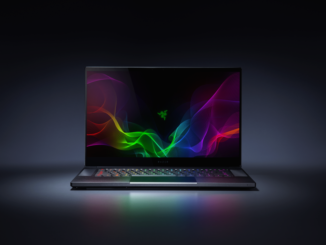
A quick look at the new Razer Blade 15.6” gaming laptop Sporting a large 15.6” edge-to-edge display with an ultra-responsive 144Hz Full HD panel, experience smoother visuals like never before and gain the advantage over the competition. Armed with the new 8th Gen Intel Core i7 processor with 6 Cores and up to an NVIDIA GeForce GTX 1070 Max-Q Design VR ready graphics, the new Razer Blade delivers even more power per cubic inch to dominate the most demanding games and applications in an ultra-thin, precision crafted CNC aluminum chassis. With Windows 10, this laptop comes with simple, built-in Mixer streaming for low-latency, interactive moments for viewers and streamers to engage with other gamers, while Xbox Play Anywhere enables you to buy a game once and play it on both your Xbox One and Windows 10 PC. It’s also Xbox Adaptive Controller compatible, supporting [ more… ]

Windows 10 Tip: A guide to the basic tools in Paint 3D

2018-05-22 KENNETH 0

Windows 10 Tip: A guide to the basic tools in Paint 3D Paint 3D is a built-in creative application that comes free with Windows 10*.  It is designed to be simple yet powerful by allowing you to create professional or fun creative projects by easily combining 2D and 3D tools. The best part is that you don’t need any design experience – Paint 3D can be used by anyone.  Its approachable interface makes it easy to customize existing 3D models from our built-in 3D library or create 3D designs from scratch. Getting started: Paint 3D’s basic navigation Brushes: Expand your artistic abilities with unique pens & brushes that mimic real materials without the mess. Try transparent watercolor that beautifully washes the canvas or oil painting so real that you can see the paint smudging.  These artistic brushes work both on [ more… ]