
Windows 10 Tip: Set up family features on your Windows 10 PC

2017-09-19 KENNETH 0

Windows 10 Tip: Set up family features on your Windows 10 PC Did you know you can add family members to each Windows 10 PC you sign in to with your Microsoft account faster than ever? You can manage family settings online at account.microsoft.com/family, and changes will be applied to any Windows 10 device the child signs in to. Set up a PC for people already in your Microsoft family Select the Start button, then select Settings > Accounts > Family & other people. Select their accounts to add them to this PC. The first time they sign in, they’ll need to enter the password for their Microsoft account. Add someone to your family On your Windows 10 PC, select the Start button, then select Settings > Accounts > Family & other people. (You’ll need to be signed in to Windows with a Microsoft account.) [ more… ]

No Image

Announcing Windows 10 Insider Preview Build 15252 for Mobile

2017-09-16 KENNETH 0

Announcing Windows 10 Insider Preview Build 15252 for Mobile Hello Windows Insiders! Today we are releasing Windows 10 Mobile Insider Preview Build 15252 to Insiders in the Fast ring. General changes, improvements, and fixes for Mobile This build includes all the improvements from KB4038788. In preparation for the release of the Windows 10 Fall Creators Update, the product version number has been updated to 1709 just like PC. We fixed an issue where, on powering the screen off/on, high demand for CPU could cause several apps to crash. Background processing of photos is an example of high CPU demand. In a photo shoot session, you may have seen the Camera app crash. We fixed an issue with the Messaging app where conversation text was displayed incorrectly. Thanks to our Insiders that quickly highlighted this issue. No downtime for Hustle-As-A-Service, Dona [ more… ]

No Image

Thanks for attending September’s Windows Community Standup

2017-09-16 KENNETH 0

Thanks for attending September’s Windows Community Standup Thanks everyone for attending and asking some fantastic questions. We strive to answer all questions and be transparent with both what we are building and why we are building them. Kevin’s next Windows Community Standup will be on October 10th, 2017 at Windows Developer Day! Kevin showed off how .NET Standard 2.0 works in a Universal Windows Platform Application by showing SqlClient code being used directly from a classic WinForm application, dragging those files into the UWP app’s code base and just running the application! Kevin also showed off some of the advances inside Windows Ink that developers can take advantage of today. Shape recognition and much more! Source: Thanks for attending September’s Windows Community Standup

More Resources for Universal Windows Platform Games with Fall Xbox One Update

2017-09-16 KENNETH 0

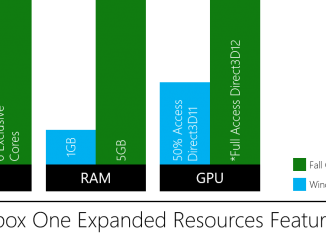
More Resources for Universal Windows Platform Games with Fall Xbox One Update Since the advent of consoles, developers have asked for ways to create games for one platform that you could run anywhere. With the release of the Expanded Resources feature in the Windows Fall Creators Update, we are taking the industry closer to that goal than it has ever been before. Now, developers will automatically have access to 6 exclusive cores, 5 GB of ram and full access to the GPU! When Windows 10 launched in July 2015, Windows and Xbox converged to a single operating system for game development and introduced the Universal Windows Platform (UWP) application model. UWP apps created for Windows 10 PCs and Xbox games created for Xbox One could be bought and run side by side on consoles, but only in a specialized environment created for lightweight [ more… ]

No Image

Windows Developer Day Returns!

2017-09-15 KENNETH 0

Windows Developer Day Returns! Windows Developer Day is back! Join us on October 10, starting at 9:30 AM PDT via live stream, or attend a viewing party in your area (location list below), as we explore what’s new in the Windows 10 Fall Creators Update for developers. The day’s schedule features an introductory keynote by Kevin Gallo and members of the Windows engineering team, a live-streamed Q&A session and several streaming sessions diving deeper into the current Windows 10 update. Learn what’s new for developers in the Windows 10 Fall Creators Update No matter what you’re working on, you’ll find plenty of new features and improvements to make your software more compelling: Game devs Game Mode and new performance enhancements improve the gameplay experience for most of your players. Xbox Live Creators Program lets you integrate Xbox Live into your game and publish to both Xbox One and Windows 10. Mixer is the [ more… ]