Windows Template Studio 1.2 released!

2017-07-21 KENNETH 0

Windows Template Studio 1.2 released! We’re extremely excited to announce the Windows Template Studio 1.2. What makes this release even more special is we’ve been accepted into the .NET Foundation! We are extremely excited to be accepted in. In this release, our major new feature is adding content into an existing application with Right-click add. We’ve grown up past only File->New .NET Foundation: We are also happy to say that we’ve been accepted into the .NET Foundation. Great open source projects like .NET Core, Roslyn, UWP Community Toolkit–and now Windows Template Studio–will be as well! What’s new: For the full list of adjustments in the 1.2 release, head over to WTS’s Github. Improvements to the Wizard: Add new content to existing WTS generated projects in your solution window via right-click We will be working toward seeing how we can enable [ more… ]


New Lights and PropertySet Interop – XAML and Visual Layer Interop, Part Two

2017-07-20 KENNETH 0

New Lights and PropertySet Interop – XAML and Visual Layer Interop, Part Two In the last post, we explored using XamlCompositionBrushBase and LoadedImageSurface to create custom CompositionBrushes that can be used to paint XAML elements directly in your markup. In today’s post, we’ll continue our look into the new improvements made to the XAML and Visual Layer Interop APIs available in the Windows 10 Creators Update. In this blog series, we’ll cover some of these improvements in the Creators Update and look at the following APIs: In Part 1: XamlCompositionBrushBase – easily paint a XAML UIElement with a CompositionBrush LoadedImageSurface – load an image easily and use with Composition APIs In Part 2, today’s post: XamlLights – apply lights to your XAML UI with a single line of XAML PointerPositionPropertySet – create 60 FPS animations using pointer position, off the [ more… ]

Forza Motorsport 7 Garage opens today

2017-07-20 KENNETH 0

Forza Motorsport 7 Garage opens today With more than 700 vehicles in the game at launch, Forza Motorsport 7 features the most diverse lineup of cars in series history. Each week in the Forza Garage we’ll put the spotlight on some of the most notable cars in the list and offer some background on what makes these cars so special. Whether you’re looking to learn something new or you’re making plans of which cars to hit first when the game is released beginning on Sept. 29 (via early access for Ultimate Edition), we hope you enjoy our weekly look at Forza’s biggest and best car list yet. We’re kicking off the Forza Garage with a bang, showcasing more than 160 cars this week alone, including the largest collection of Porsches, Lamborghinis, and Ferraris ever seen in a racing game. Head over [ more… ]

Working with Brushes and Content – XAML and Visual Layer Interop, Part One

2017-07-19 KENNETH 0

Working with Brushes and Content – XAML and Visual Layer Interop, Part One The Composition APIs empower Universal Windows Platform (UWP) developers to do beautiful and powerful things when they access the Visual Layer. In the Windows 10 Creators Update, we made working with the Visual Layer much easier with new, powerful APIs. In this blog series, we’ll cover some of these improvements in the Creators Update and take a look at the following APIs: In Part 1, today’s post: XamlCompositionBrushBase – easily paint a XAML UIElement with a CompositionBrush LoadedImageSurface – load an image easily and use with Composition APIs In Part 2, we’ll look at: XamlLights – apply lights to your XAML UI with a single line of XAML PointerPositionPropertySet – create 60 FPS animations using pointer position, off the UI thread! Enabling the Translation property – animate [ more… ]

Windows 10 Tip: Get started with the Photos app and Sway

2017-07-18 KENNETH 0

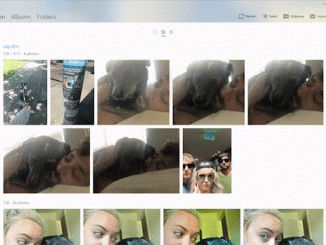
Windows 10 Tip: Get started with the Photos app and Sway The Photos app automatically creates albums for you based on when and where they were taken, but if you want to edit an existing album or create a new one, simply select albums, the album you want and then click Edit. You can create a new album by selecting Albums, Create new Album and then selecting the photos you’d like to include. From there you can edit the title, add or remove photos and change the cover photo. Easily share all the awesome photos you’ve catalogued right from the Photos app by clicking the Share the Album button. Transform your album into an interactive story in minutes with Sway To get started, simply open your album, and select Share and then Create a Sway. After the album is uploaded [ more… ]