No Image

Desktop Bridge: Smooth User Transition and Data Migration

2017-03-11 KENNETH 0

Desktop Bridge: Smooth User Transition and Data Migration Overview The Windows 10 Creators Update will help provide smooth user transition along with some best practices for app developers to follow. This feature is available on the current insider builds. Users will be encouraged to download the store version of their desktop apps. If the user already has the previous desktop version of the app, the transition experience should be as seamless as possible. User Transition: Taskbar Pins & Start Tiles Many users typically pin their favorite or most used apps to the taskbar pin or the start menu. This enables them to access the apps much faster. With the Creators Update, app developers can re-route the taskbar pins and the start tile shortcuts to point to the store version of the desktop app. Here’s a sample AppXManifest.xml snippet which shows [ more… ]

This Week on Windows: A new Cortana skill, Forza Horizon 3 and more

2017-03-10 KENNETH 0

This Week on Windows: A new Cortana skill, Forza Horizon 3 and more We hope you enjoyed today’s episode of This Week on Windows! Head over here to read all the Windows 10 news from Mobile World Congress, or keep reading to catch up on this week’s news and what’s new in the Windows Store. In case you missed it: <!– !function(a,b){"use strict";function c(){if(!e){e=!0;var a,c,d,f,g=-1!==navigator.appVersion.indexOf("MSIE 10"),h=!!navigator.userAgent.match(/Trident.*rv:11./),i=b.querySelectorAll("iframe.wp-embedded-content");for(c=0;c<i.length;c++){if(d=i,!d.getAttribute("data-secret"))f=Math.random().toString(36).substr(2,10),d.src+="#?secret="+f,d.setAttribute("data-secret",f);if(g||h)a=d.cloneNode(!0),a.removeAttribute("security"),d.parentNode.replaceChild(a,d)}}}var d=!1,e=!1;if(b.querySelector)if(a.addEventListener)d=!0;if(a.wp=a.wp||{},!a.wp.receiveEmbedMessage)if(a.wp.receiveEmbedMessage=function(c){var d=c.data;if(d.secret||d.message||d.value)if(!/[^a-zA-Z0-9]/.test(d.secret)){var e,f,g,h,i,j=b.querySelectorAll('iframe[data-secret="'+d.secret+'"]'),k=b.querySelectorAll('blockquote[data-secret="'+d.secret+'"]');for(e=0;e<k.length;e++)k[e].style.display="none";for(e=0;e1e3)g=1e3;else if(~~g<!]]> <!– !function(a,b){"use strict";function c(){if(!e){e=!0;var a,c,d,f,g=-1!==navigator.appVersion.indexOf("MSIE 10"),h=!!navigator.userAgent.match(/Trident.*rv:11./),i=b.querySelectorAll("iframe.wp-embedded-content");for(c=0;c<i.length;c++){if(d=i,!d.getAttribute("data-secret"))f=Math.random().toString(36).substr(2,10),d.src+="#?secret="+f,d.setAttribute("data-secret",f);if(g||h)a=d.cloneNode(!0),a.removeAttribute("security"),d.parentNode.replaceChild(a,d)}}}var d=!1,e=!1;if(b.querySelector)if(a.addEventListener)d=!0;if(a.wp=a.wp||{},!a.wp.receiveEmbedMessage)if(a.wp.receiveEmbedMessage=function(c){var d=c.data;if(d.secret||d.message||d.value)if(!/[^a-zA-Z0-9]/.test(d.secret)){var e,f,g,h,i,j=b.querySelectorAll('iframe[data-secret="'+d.secret+'"]'),k=b.querySelectorAll('blockquote[data-secret="'+d.secret+'"]');for(e=0;e<k.length;e++)k[e].style.display="none";for(e=0;e1e3)g=1e3;else if(~~g<!]]> Here’s what’s new in the Windows Store: Fantastic Beasts and Where to Find Them + Harry Potter Movie Sale – Buy or rent starting from $2.99   Seventy years before Harry Potter reads his famous book at Hogwarts, magizoologist Newt Scamander inadvertently lets his magical beasts loose in 1926 New York, where the American wizarding community is threatened by exposure to [ more… ]

Playable Ads – Acquire Users Who Love to Engage with Your App

2017-03-10 KENNETH 0

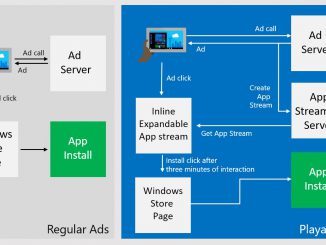
Playable Ads – Acquire Users Who Love to Engage with Your App We are happy to announce the launch of the preview of Playable Ads in the Windows Dev Center. We have made several ground-breaking enhancements in the way users interact with ads so that developers can acquire the users who are more engaged and proven to be more profitable. What are Playable Ads? Let us first understand how the current ad campaigns work. Every time a user clicks on the app install ad, he/she is taken to the Windows store page, leaving the current app to decide whether to install the respective app. The information contained in the product description page is not always complete and the experience a user can get from the actual app usage can potentially differ a lot. This sometimes leads to a quick uninstall [ more… ]

Announcing Windows 10 Insider Preview Build 15051 for Mobile

2017-03-09 KENNETH 0

Announcing Windows 10 Insider Preview Build 15051 for Mobile Hello Windows Insiders! Today we are excited to be releasing Windows 10 Insider Preview Build 15051 for Mobile to Windows Insiders in the Fast ring. Other changes, improvements, and fixes for Mobile We appreciate several of you sending us feedback on this and last week, we focused on fixing issues that resulted in frequent reboots for some Insiders on Build 15047. If you continue to experience unexpected reboots, be sure to send in feedback to us via Feedback Hub so the team can take a look! We fixed an issue resulting in certain inbox apps, such as Calculator, Outlook Mail, Outlook Calendar, Groove Music, no longer being present on the system after a hard reset. We fixed an issue resulting in Groove Music not resuming playback after ending a phone call [ more… ]

No Image

Scrolling on the web: A primer

2017-03-09 KENNETH 0

Scrolling on the web: A primer Scrolling is one of the oldest interactions on the web. Long before we had pull-to-refresh or infinite-loading lists, the humble scrollbar solved the web’s original scaling problem: how can we interact with content that’s stretched beyond the available viewport? Animations by Rachel Nabors Today, scrolling is still the most fundamental interaction on the web, and perhaps the most misunderstood. For instance, do you know the difference between the following scenarios? User scrolls with two fingers on a touch pad User scrolls with one finger on a touch screen User scrolls with a mouse wheel on a physical mouse User clicks the sidebar and drags it up and down User presses up, down, PageUp, PageDown, or spacebar keys on a keyboard If you ask the average web user (or even the average web developer!) they [ more… ]