
Homegrown Trailers hits the road with Windows 10

2017-03-01 KENNETH 0

Homegrown Trailers hits the road with Windows 10 Growing up in the Pacific Northwest, I’ve been a lifelong adventurer who enjoys camping in the great outdoors with few amenities and the ability to disconnect from the urban world. When I had the first of my two daughters ten years ago, I knew things would change and they did. As the girls got older, I realized that the amount of things you have to bring to keep the kiddos comfortable can be overwhelming. I soon discovered that I was the only one who could deal with a lack of privacy, pitching tents and sleeping on the ground. I knew there had to be a better way to enjoy the outdoors with my family, and as a sustainability consultant, I was determined to find the greenest path. Four years ago after an [ more… ]
Getting Started with a Mixed Reality Platformer Using Microsoft HoloLens

2017-02-28 KENNETH 0

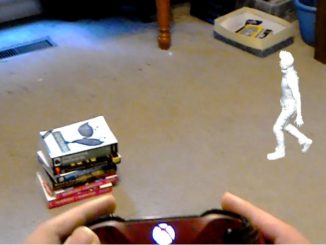
Getting Started with a Mixed Reality Platformer Using Microsoft HoloLens The platform game genre has undergone constant evolution, from its earliest incarnations in Donkey Kong and Pitfall to recent variations like Flappy Bird. Shigeru Miyamoto’s Super Mario Bros. is recognized as the best platform game of all time, setting a high bar for everyone who came after. The Lara Croft series built on Shigeru’s innovations by taking the standard side-scrolling platformer and expanding it into a 3D world. With mixed reality and HoloLens, we all have the opportunity to expand the world of the platform game yet again. Standard video game conventions undergo a profound change when you put a platformer in a mixed reality environment. First of all, instead of sitting in a chair and moving your character inside your display screen, you physically follow your character as he [ more… ]

No Image

Mobile World Congress 2017: Porsche Design reveals 2-in-1 with Windows 10

2017-02-28 KENNETH 0

Mobile World Congress 2017: Porsche Design reveals 2-in-1 with Windows 10 The Porsche Design BOOK ONE is built to enable the best of Windows 10 Pro. Both the touch display and the Precision Touchpad for Windows 10 Pro use high-precision, multi-gesture control interfaces. The digital stylus input function is optimized for use with Windows Ink, so you can easily draw and take notes on the touchscreen, or draw on websites in Microsoft Edge. Tablet Mode in Windows 10 Pro delivers a smooth, touch-first experience, perfect for this 2-in-1; your apps will scale smoothly, and onscreen features will adapt for easy navigation. The device’s 5-MP camera with infrared sensor allows you to login simply and securely with facial recognition using Windows Hello, and has your digital personal assistant – Cortana* – built-in, to help you find things, complete tasks, set reminders [ more… ]

No Image

Mobile World Congress 2017: HP debuts 2-in-1 device with Windows 10

2017-02-28 KENNETH 0

Mobile World Congress 2017: HP debuts 2-in-1 device with Windows 10 Today at Mobile World Congress 2017, HP Inc. unveiled a new 2-in-1 device powered by Windows 10, along with a range of accessories for the company’s x2 and x3 portfolio. Let’s take a closer look at what they announced. The HP Pro x2 512 G2 with Windows 10 The new Pro x2 612 G2 is designed to inspire the way mobile professionals across a range of industries work – merging individuality and productivity with industrial design in a sleek and secure device. The Pro x2 is a versatile 2-in-1 detachable with a touchscreen perfect for drawing with Windows Ink or marking up webpages in Microsoft Edge. It’s built with multiple modes for commercial workflows including presentation mode, inking mode and notebook mode for productivity. The HP Pro x2 Collaboration Keyboard snaps easily [ more… ]

Windows 10 Tip: Import favorites from other browsers to Microsoft Edge

2017-02-28 KENNETH 0

Windows 10 Tip: Import favorites from other browsers to Microsoft Edge Did you know you can easily import your favorite sites from other browsers including Chrome, Internet Explorer and Firefox with just two clicks, and see them organized in the Hub? Hub lets you to access your favorites, downloads, reading list and history all in one place. Here’s how to get started importing favorites: To import your favorites, go to the Hub  and click Settings on the top right. Select the browser you want to import favorites from and click Import. All your imported favorites will show up in the Hub under the Favorites section. Have a great week! Source: Windows 10 Tip: Import favorites from other browsers to Microsoft Edge