No Image

Our continuing commitment to your privacy with Windows 10

2017-01-11 KENNETH 0

Our continuing commitment to your privacy with Windows 10 {$inline_image} Many of you have asked for more control over your data, a greater understanding of how data is collected, and the benefits this brings for a more personalized experience. Based on your feedback, we are launching two new experiences to help ensure you are in control of your privacy. First, today we’re launching a new web-based privacy dashboard so you can see and control your activity data from Microsoft including location, search, browsing, and Cortana Notebook data across multiple Microsoft services. Second, we’re introducing in Windows 10 a new privacy set up experience, simplifying Diagnostic data levels and further reducing the data collected at the Basic level. These Windows 10 changes are being introduced in a Windows Insider build soon for feedback first and will be rolled out to everyone [ more… ]


Announcing Windows 10 Insider Preview Build 15002 for PC

2017-01-10 KENNETH 0

Announcing Windows 10 Insider Preview Build 15002 for PC Hello Windows Insiders! Today we are excited to be releasing Windows 10 Insider Preview Build 15002 for PC to Windows Insiders in the Fast ring. This is a BIG update so please take time to look through all of the new changes we detail below. What’s new in Build 15002 Microsoft Edge Updates The Microsoft Edge Team has lots of new features to share, focused on making it easier than ever to keep track of your tabs and pick up where you left off, as well as a few other surprises! Tab preview bar: It’s easy to lose track of what’s in your tabs, especially when you have many tabs from the same site, with similar titles and icons. Tab preview bar allows you to easily glance at a visual preview [ more… ]

Windows 10 Tip: How to set up multiple profiles with Windows Hello

2017-01-10 KENNETH 0

Windows 10 Tip: How to set up multiple profiles with Windows Hello We’ve talked about how you can get started with Windows Hello – today, we’re going to show you how you can add multiple accounts to the same Windows 10 PC, and set it up so anyone you share it with can login to their own account using their own face or fingerprint with Windows Hello. To get started, launch the Windows Settings menu (or simply type Windows key + I): Type in the search box ‘’Family’’ or “Other people,’’ or go to Accounts > Family & other people. Add a family member or friend Select “Add a family member” or “Add someone else to this PC based on your needs.” Type in their Microsoft account email address. Have them login with their new account Sign out from your [ more… ]

ICYMI – What happened over vacation?

2017-01-07 KENNETH 0

ICYMI – What happened over vacation? We hope everyone had a great vacation and a very happy New Year! We’re excited to be back and while we have a few exciting updates on the way, here are a few things that you might have missed. Patterns & Controls Tutorials Fly out menus. Dialogue boxes. Buttons. Check, check and check. Learn how to add all of these controls and patterns to your UWP apps, and spruce up your UI for 2017. Create UI for apps by using controls like buttons, text boxes, & combo boxes to display data & get user input. https://t.co/dk8uDmFu42 — Windows Developer (@windowsdev) December 27, 2016 Tell us what you want to see on our blog! Our blog team wants to create the content that you want to read. Sounds simple, right? Do you want more tutorials? [ more… ]

This Week on Windows: CES, Forza Horizon 3, Cortana tips and more

2017-01-07 KENNETH 0

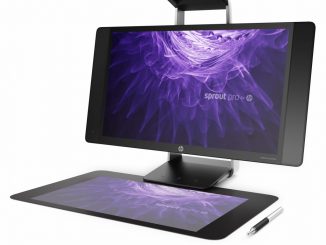
This Week on Windows: CES, Forza Horizon 3, Cortana tips and more This Week on Windows, we’re bringing you new releases including The Girl on the Train and Sherlock, Season 4, talking all about CES 2017 and we’re showing you how to get the most out of our favorite digital assistant, Cortana. Here’s a recap of what happened at CES 2017: Whether you’re looking for a new gaming PC, interested in 2-in-1 convertibles or thinking about a ThinkPad, we’ve got the latest Windows 10 tech ready to rock – check these out. HP First off was the HP Sprout Pro – the second-generation all-in-one PC with its unique HD resolution projector, touch mat and 2d/3d cameras that make it easier than ever to capture a 3D image. Lenovo Lenovo ThinkPad X1 Yoga From laptops to tablets, Lenovo’s new ThinkPad devices [ more… ]