
No Image

Reengage your customers with UWP ad campaigns and push notifications

2016-12-06 KENNETH 0

Reengage your customers with UWP ad campaigns and push notifications We’re pleased to announce that all developers can now use new features in Windows Dev Center to engage with customers of their UWP apps.  Developers can build segments of their customers and use them to create custom retargeting and reengagement ad campaigns for their UWP apps or send push notifications. Until recently, these powerful monetization and engagement capabilities were only available to Windows Dev Center Insiders. What are retargeting and reengagement ad campaigns? A retargeting ad campaign is type of advertising campaign that helps you reach a specific group of your customers who have taken a certain action with your UWP app. For example, if some portion of your customers have spent more than $10 on add-ons, you could retarget that specific group of customers with a custom ad campaign [ more… ]
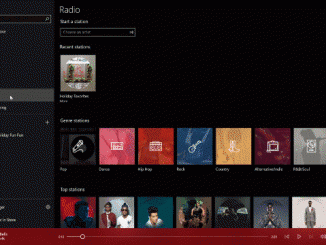
Windows 10 Tip: Find your favorite holiday music with Microsoft Groove

2016-12-06 KENNETH 0

Windows 10 Tip: Find your favorite holiday music with Microsoft Groove Today, we’re showing you a couple ways you can make the most of Groove Music for all your holiday playlists! From modern twists such as Josh Groban’s “Have yourself a Merry Little Christmas” to oldie classics like Frankie Valli’s “Merry Christmas Baby,” you’ll love the hand-selected holiday playlists to set the perfect holiday mood. You can start listening now if you’re a Groove Music Pass subscriber – and if you aren’t, you can sign up here for a free 30-day trial and start listening today on your Windows 10 devices. Enjoy a daily musical treat with 31 days of holiday playlists Save time and turn the jolly up with featured holiday playlists, where we will be bringing you 31 days of fresh holiday playlists every day.  Simply launch the [ more… ]

No Image

The next generation of makers: UW Formula Motorsports Team

2016-12-06 KENNETH 0

The next generation of makers: UW Formula Motorsports Team In celebration of Computer Science week, we wanted to highlight a group of student engineers using Surface and their engineering chops to build a Formula 1 style race car. Check out the video below to hear about the challenges they face and the competitive advantage Surface Book and Surface Pen bring to the team. Make sure to check out more amazing things being done on Surface over at Created on Surface and please give us a shout on Twitter via @Surface with your #CreatedOnSurface activities! Source: The next generation of makers: UW Formula Motorsports Team

Get ready for WinHEC 2016

2016-12-06 KENNETH 0

Get ready for WinHEC 2016 This year’s event will consist of talks and presentations about Microsoft’s vision for the hardware ecosystem with innovations in mixed reality, gaming, and other incredible opportunities for partners powered by the Windows 10 Creators Update. Attendees will gain an understanding of what’s next for Windows 10 and how to build devices that will take advantage of new capabilities. The WinHEC keynote begins Thursday, Dec. 8 at 9:30 a.m. in Shenzhen, China (Wednesday, Dec. 7 at 5:30 pm Pacific time). We’ll be sharing our keynote news right here on the Windows Blog along with details on how to watch the keynote on demand. Stay tuned! Source: Get ready for WinHEC 2016

No Image

ICYMI – Animations, C++/WinRT, Surface Dial and Symlinks

2016-12-03 KENNETH 0

ICYMI – Animations, C++/WinRT, Surface Dial and Symlinks Did you miss us over the long weekend? We missed you, too. Here’s what you might’ve missed this past week! Symlinks Symlinks haven’t always been easy to access or create for Windows developers. Starting with Windows 10 Insider Preview Build 14972, devs can create symlinks without needing to elevate the console as administrator. Essentially, this is just one of many steps towards making the Windows platform more efficient and easier for developers. The next Insider Preview Build will allow devs to create symlinks without elevating the console to admin. https://t.co/uEER8hI82P — Windows Developer (@windowsdev) December 2, 2016 C++/WinRT C++/WinRT allows developers to both author and consume Windows Runtime APIs using any standards-compliant C++ compiler.  C++/WinRT is designed to provide C++ developers with first-class access to the modern Windows API. Check it out [ more… ]