Kick off the holiday ‘to-do’ season with Windows 10 features and devices

2016-11-24 KENNETH 0

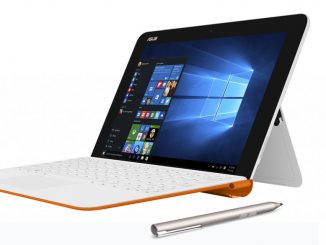
Kick off the holiday ‘to-do’ season with Windows 10 features and devices Windows 10 can help you make the most of your holidays in ways like creating to-do lists with Cortana* and making holiday shopping a little easier with Cortana and Microsoft Edge. Together with the latest Windows 10 devices, you can make the most out of the holidays in style. The latest Windows 10 devices from our partners are thinner, lighter and more beautiful than ever, with long battery life to power through your holidays on-the-go. New, higher-resolution screens and small-bezel OLED displays offer vibrant color, and 2-in-1 PCs add the flexibility to work on a laptop, draw on a tablet with Windows Ink or flip to the perfect angle to watch holiday movies – all with the same device. Budget-friendly devices ASUS Transformer Mini T102 – This 10.1-inch [ more… ]

No Image

Dev Projects for the Long Weekend

2016-11-24 KENNETH 0

Dev Projects for the Long Weekend Find your favorite chair, kick your feet up and grab yourself a cup of coffee. It’s finally time to pick up some of the dev projects you’ve been eyeballing from behind the hazy fog of pre-vacation deadlines. For the long weekend, we’ve assembled a quick list of three projects we’ll be working on between family time and scouring Stack Overflow for answers to life’s questions. Take a look below to get started! IoT for the Whole Family IoT projects can be both fun and practical – take a look at a few of our favorite selections below. After securing your home with an IoT Security Camera and automating the rest of your house, you might really need to think about rewarding yourself with that automated Kegerator. Just saying. Looking for a project to take [ more… ]

Windows Ink 3: Beyond Doodling

2016-11-24 KENNETH 0

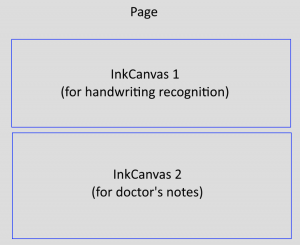
Windows Ink 3: Beyond Doodling In the first post in this series, we took a quick look at Windows Ink using the InkCanvas and saw that it can be as simple as one line of code to add inking support to your application. In the second post, we show you how to customize the Ink experience in your app with InkToolbarCustomPen and InkToolbarCustomToolButton, in addition to the out-of-the box items like InkToolbarBallpointPenButton and InkToolbarPenConfigurationControl. In both of those explorations, we stayed within the context of a drawing style application. In today’s post, we will look at how Windows Ink can be used to bring the natural input experience of using a pen to other types of applications and scenarios. Pen input can be useful in a majority of applications that require some sort of user input. Here are a few [ more… ]

This Week on Windows: Black Friday Edition

2016-11-24 KENNETH 0

This Week on Windows: Black Friday Edition Save big on hit apps, games, movies & more with deals in the Windows Store Today, we’re excited to share all the awesome deals the Windows Store has for Black Friday! Available until Nov. 28, this collection* includes great deals on apps, games, music, movies and more for your Windows 10 PC or Xbox console. Keep reading for some of the top titles, check out the full collection, or head over here to learn more about all the great deals on Windows 10 devices and all things Xbox we mentioned in this week’s latest episode. GAMES Gears of War 4 – 40% off Beginning today through Nov. 28, purchase Gears of War 4 at 40% off and receive the entire Gears of War Collection for play on Xbox One. Get the game today [ more… ]

No Image

Windows at Microsoft Connect(); // 2016

2016-11-23 KENNETH 0

Windows at Microsoft Connect(); // 2016 During the Connect(); // 2016, the Windows team talked about the Universal Windows Platform and about some of the great tooling improvements that have happened in recent months. Kevin Gallo, VP and Program Manager Director of the Windows Platform team, was joined by Mazhar Mohammed and Dave Alles for an hour-long panel discussion and Q&A on Channel 9. Mazhar is the Director of Partner Services of for the Windows Store team, and Dave is the Group Program Manager for the team that created the Maps app for Windows. Check out the video below to see the interesting conversation between leaders of the teams that create the Windows Platform and the Store, and one of the teams that uses both in creating a major Windows app. Kevin talks about why developers should target UWP, while Mazhar [ more… ]