This Week on Windows: New features in Windows Maps, Cortana and more

2016-11-19 KENNETH 0

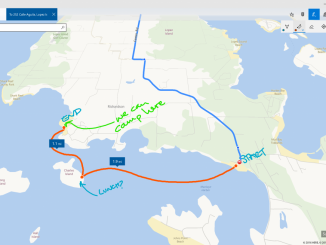
This Week on Windows: New features in Windows Maps, Cortana and more We hope you enjoyed this week’s episode of This Week on Windows! Read more about what’s new in the Windows Maps app and the new ways Cortana can help you with your to-do lists, or head over here to read our Windows 10 Tip on four ways to use Windows Ink in the Windows Maps app. Here’s what’s new in the Windows Store this week: 14-day free trial of Sling TV   Your Sling TV exclusive is here! Get an extended 14-day free trial of Sling TV and start watching the best of live TV straight from Windows 10. Stream your favorite live shows and on-demand entertainment, including live college basketball and football, and your favorite shows from premium channels. Download the app today and get 14 days FREE of [ more… ]
Announcing UWP Community Toolkit 1.2

2016-11-19 KENNETH 0

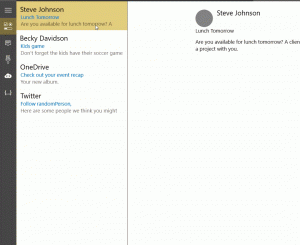
Announcing UWP Community Toolkit 1.2 Following our commitment to ship new versions at a fast pace, I’m thrilled to announce the availability of UWP Community Toolkit 1.2. If you want to get a first glance, you can install the UWP Community Toolkit Sample App directly from the Windows Store. The focus of this version was to stabilize current features while adding the most wanted ones that were missing. A full list of features and changes is available in the release notes. Here’s a quick preview: New Helpers. we worked on providing 7 new helpers to help with everyday tasks: BackgroundTaskHelper to help you work with background tasks HttpHelper to help you deal with HTTP requests in a secure and reliable way PrintHelper to help you print XAML controls DispacherHelper to help you work with tasks that need to run on [ more… ]

No Image

Innovating with Microsoft HoloLens: Vuforia SDK is Here

2016-11-18 KENNETH 0

Innovating with Microsoft HoloLens: Vuforia SDK is Here Earlier this year at Build, it was announced that Vuforia, one of the world’s most widely used platforms for AR development, would support Microsoft HoloLens through its 275,000 developers. Vuforia introduced an important capability to HoloLens – the power to connect experiences to specific things in the environment. And just last month, we showcased our aspiration to empower a new wave of creativity, and our goal to enable that through 3D and mixed reality for everyone. Now, Vuforia is taking that one step further, and its SDK is now commercially available to the public. We’ve continued to see the ways that Microsoft HoloLens is disrupting and transforming industries, enabling solutions that were previously nonexistent. When used in HoloLens, these 3D visualizations can easily be expanded and transported to actual size in any [ more… ]

 Windows 10 Maps updates make inking better than ever

2016-11-18 KENNETH 0

 Windows 10 Maps updates make inking better than ever On the Maps team, we are always working to improve the maps experience and deliver more than a simple tool to get you where you need to go. We want to help you discover the world around you and deliver the best personal map and navigation experiences so you can get there your way. Natural interaction with Windows Ink We want it to be as easy and natural as possible to use the Maps experience, so that means including support for touch and ink, not just a mouse and keyboard.  Our touch support lets you control the map with gestures such as pinch to zoom or tilting the map by dragging two fingers down, so you can see things in 3D. The interaction with the map becomes even more natural and [ more… ]

Announcing Windows 10 Insider Preview Build 14971 for PC

2016-11-18 KENNETH 0

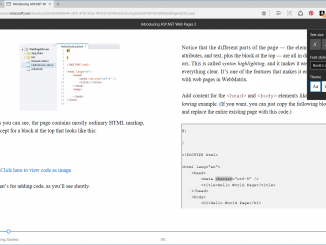
Announcing Windows 10 Insider Preview Build 14971 for PC Hello Windows Insiders! Today we are excited to be releasing Windows 10 Insider Preview Build 14971 for PC to Windows Insiders in the Fast ring. What’s new in Build 14971 Read EPUB books in Microsoft Edge: The reading experience will get even better with the Windows 10 Creators Update! In addition to providing a great reading experience for PDF files – you can now read any unprotected e-book in the EPUB file format with Microsoft Edge. When you open an unprotected e-book in Microsoft Edge, you will be taken into a customizable reading experience where you can change the font and text size and choose between 3 themes: light, sepia, and dark. As you read, you can leave bookmarks. To navigate through an e-book, you can use the table of contents [ more… ]