
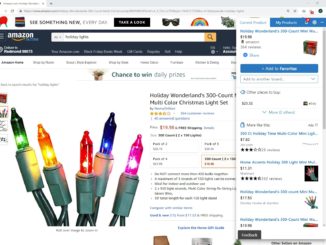
Save money and time with Microsoft’s Personal Shopping Assistant

2018-11-22 KENNETH 0

Save money and time with Microsoft’s Personal Shopping Assistant Microsoft’s Personal Shopping Assistant, first released in 2016 through The Garage, is a browser add-on that helps you get the best deals at more than 50,000 online stores, from top retailers like Amazon and Walmart to your favorite boutique shop on Etsy. Track prices for products on thousands of stores Never miss a deal again with the Personal Shopping Assistant. When you’re on a product web page, click the heart shaped button in the assistant widget and add it to your Favorites. The assistant will automatically notify you when the price changes, and you can see all price changes from the notifications screen in the assistant. Compare prices across retailers Shop smarter with instant price comparisons from other retailers. When you’re shopping online, the assistant will notify you when products you’re [ more… ]

No Image

Windows 10 SDK Preview Build 18282 available now!

2018-11-21 KENNETH 0

Windows 10 SDK Preview Build 18282 available now! Today, we released a new Windows 10 Preview Build of the SDK to be used in conjunction with Windows 10 Insider Preview (Build 18282 or greater). The Preview SDK Build 18282 contains bug fixes and under development changes to the API surface area. The Preview SDK can be downloaded from developer section on Windows Insider. For feedback and updates to the known issues, please see the developer forum. For new developer feature requests, head over to our Windows Platform UserVoice. Things to note: This build works in conjunction with previously released SDKs and Visual Studio 2017. You can install this SDK and still also continue to submit your apps that target Windows 10 build 1809 or earlier to the Microsoft Store. The Windows SDK will now formally only be supported by Visual Studio 2017 and greater. You can [ more… ]

Keeping you updated on Windows Hello

2018-11-21 KENNETH 0

Keeping you updated on Windows Hello At Microsoft, we take your device and account protection seriously, which is why we’ve been on a mission to eliminate passwords. Passwords can be difficult to remember, are often reused and can be used to hack your account anywhere, anytime, from any device. Windows Hello is a key component in our effort to finally saying goodbye to passwords. Using facial recognition, a fingerprint, or PIN, Windows Hello is a fast, secure and password-less way to unlock your Windows 10 PC.1 We’ve been busy bringing the latest and greatest features to Windows Hello and account protection and wanted to take some time to update you on what’s new. Account protection and sign-in We’re making it easier than ever to protect your identity on Windows. In the Windows Security app, available on all Windows 10 PCs2, [ more… ]

Windows Template Studio 2.5 released!

2018-11-21 KENNETH 0

Windows Template Studio 2.5 released! We’re extremely excited to announce the Windows Template Studio 2.5! As always, we love how the community is helping. If you’re interested, please head over to head over to WTS’s Github. What’s new: Full list of adjustments in the 2.5 release, WTS’s Github has a full changelog. Included in this version: Improved startup time splitting templates by platform/language Improved guidance on Suspend and Resume feature Support for VS 2019 Bug fixes Navigation View uses WinUI Library Pages updated with current Fluent guidance Recently added in prior versions: Multiple Ink pages Data Grid from Windows Community Toolkit page Dev platform updates: Updated target platform version to 10.0.17763.0 and min target version to 10.0.17134.0 Updated Microsoft.NETCore.UniversalWindowsPlatform to 6.1.9 AdaptiveCards to 1.1.0 AppCenter.Analytics and Microsoft.AppCenter.Crashes to 1.10.0 UI.for.UniversalWindowsPlatform 1.0.1.2 MVVMLight to 5.4.1.1 Windows Community Toolkit to 5.0.0 How [ more… ]

No Image

Getting Started with Windows Machine Learning

2018-11-21 KENNETH 0

Getting Started with Windows Machine Learning With the Windows 10 October 2018 Update, Windows Machine Learning is out of preview and ready to become part of your AI toolbox. The Windows ML inference engine evaluates trained models locally on Windows devices, removing concerns of connectivity, bandwidth, and data privacy. This video series will help you understand how you can get started with Windows ML and explore the new APIs through the lens of Rufus the robot. Overview of Windows Machine Learning What is Windows Machine Learning and why should you care? Killian and Rosane walk through these questions and clarify the positioning and capabilities of this powerful AI inference engine. Windows Machine Learning: Hello World (MNIST Edition) Let’s jump to the code! Killian and Rosane work through the Windows ML MNIST tutorial and answer questions developers commonly ask along the [ more… ]